40 Websites Built with Laravel: Real-World Examples

If you’re still asking “Can Laravel handle serious production apps?”, you’re asking the wrong question.

Laravel already powers millions of live websites globally

And not just side projects.

We’re talking about:

  • SaaS platforms with millions of users
  • Fintech and data-heavy apps
  • Media platforms handling huge traffic
  • Ecommerce systems with real transactions

This blog gives you 40 real Laravel-powered products across categories like SaaS, ecommerce, media, and fintech.

No open-source packages.

No GitHub toys.

Only real products used by real users.

Why CTOs Choose Laravel (Even in 2026)

Before we dive into examples, understand why Laravel keeps winning:

  • Fast time-to-market (critical for startups)
  • Built-in auth, queues, caching
  • Strong ecosystem (jobs, queues, APIs)
  • Easy scaling with modern infra
  • Clean architecture → easier hiring & onboarding

Laravel isn’t just a framework.

It’s a business velocity tool.

SaaS Platforms Built with Laravel

These are the strongest proof points. SaaS products demand scalability, reliability, and clean architecture.

What This List Actually Proves

Let’s be clear.

This isn’t about Laravel being “good”.

This is about Laravel being:

  • Production-ready
  • Scalable across industries
  • Trusted by real businesses
  • Capable of handling millions of users

There are 600K+ live Laravel websites globally

And 80K+ companies actively using it

1. Alison

Alison is one of the largest free online learning platforms globally, offering courses, diplomas, and certifications across business, IT, health, and personal development. It serves 20M+ learners across 190+ countries, which makes scalability critical. Laravel helps manage its massive user base, course delivery system, and certification workflows efficiently.

2. Invoice Ninja

Invoice Ninja is a SaaS invoicing and payments platform used by 170,000+ businesses worldwide. It allows users to create invoices, track expenses, manage clients, and accept payments. Laravel powers its multi-tenant architecture, permission systems, and billing workflows, core requirements for any serious SaaS product.

3. Barchart

Barchart delivers real-time financial market data, analytics, and trading tools across global markets like stocks, forex, and commodities. It’s used by traders and financial professionals who rely on accurate, fast data. Laravel supports the backend systems that handle large datasets, real-time updates, and analytical tools.

4. MyRank

MyRank is an Indian edtech platform focused on competitive exam preparation (GRE, GATE, Bank PO, etc.). It combines online learning, mock tests, and performance analytics. Laravel enables smooth user management, scalable testing systems, and structured content delivery for thousands of students.

5. Laracasts

Laracasts is a premium learning platform for developers, especially in Laravel, PHP, and modern web development. With millions of users and thousands of video lessons, it operates like a full SaaS content platform. Laravel powers everything from subscriptions and video delivery to user progress tracking.

6. LaraCopilot

LaraCopilot is an AI-powered development layer for Laravel, designed to help founders and teams build production-ready applications faster. It streamlines tasks like scaffolding, backend logic generation, and workflow automation reducing development time significantly. Instead of replacing Laravel, it amplifies it, enabling teams to go from idea to working product much faster.

7. World Walking

World Walking is a fitness platform that gamifies walking by tracking steps and converting them into virtual journeys across the globe. It has processed billions of steps from users worldwide. Laravel supports its user tracking systems, gamification logic, and performance reliability at scale.

8. Cachet

Cachet is a status page platform used by companies to communicate outages, downtime, and system health to users. It’s critical for transparency during incidents. Laravel enables real-time updates, incident tracking, and clean dashboards for both teams and customers.

9. Usetably

Usetably focuses on improving customer experience through booking management and onboarding workflows (especially in hospitality use cases). It allows businesses to manage reservations, preferences, and payments in one place. Laravel helps integrate payment systems, manage user data, and automate workflows efficiently.

10. Contentoo

Contentoo is a content marketplace that connects businesses with freelance writers and creators. It handles contractor selection, communication, and project workflows. Laravel powers its marketplace logic, secure communication, and third-party integrations essential for managing supply and demand at scale.

Quick Takeaway for CTOs

These aren’t “Laravel demo apps.”

They are:

  • Multi-tenant SaaS (Invoice Ninja)
  • Data-heavy fintech (Barchart)
  • Global edtech platforms (Alison, MyRank)
  • Marketplaces (Contentoo)
  • Infrastructure tools (Cachet)

Same pattern:

Laravel handles users, data, workflows, and scale without friction.

11. Daalder

Daalder is a modern headless ecommerce platform built to support global commerce at scale. It enables businesses to manage multiple storefronts, currencies, and regions from a single backend. The headless architecture allows teams to decouple frontend and backend, giving full flexibility in building custom shopping experiences. Laravel plays a key role in handling APIs, order management, and scalable backend operations.

12. YouCan Shop

YouCan Shop is an ecommerce platform designed for creators, small businesses, and merchants to quickly launch online stores. It simplifies store setup, product management, and payment handling similar to Shopify, but tailored for emerging markets. Laravel powers its backend workflows, including store creation, checkout systems, and merchant dashboards, making it easy to scale across thousands of sellers.

13. Bagisto (Commercial Implementations)

Bagisto itself is an open-source Laravel ecommerce framework, but what matters here is its real-world commercial usage. Thousands of businesses use Bagisto to run production ecommerce store ranging from single-brand shops to multi-vendor marketplaces. It supports features like multi-store, multi-currency, and headless commerce, making it suitable for both startups and enterprise use cases.

14. StarQuik

StarQuik is an Indian online grocery platform (by Tata Group) that handles real-world ecommerce complexity inventory, logistics, and local delivery. It serves urban customers with daily essentials, requiring reliable backend systems to manage orders and supply chains. Laravel is used to support scalable operations, smooth checkout flows, and backend integrations with logistics and inventory systems.

15. Ethos Watches (Sub-platforms)

Ethos Watches is a luxury watch retailer with a strong digital presence. While the main platform uses multiple technologies, some of its backend systems and sub-platforms are powered by Laravel. These systems manage catalog data, customer interactions, and ecommerce workflows for high-value transactions. Laravel helps maintain flexibility while supporting premium user experiences.

Quick Takeaway for CTOs

Ecommerce is where things break fast:

  • Payments
  • Inventory
  • Scaling traffic
  • Multi-region complexity

Yet these platforms prove:

Laravel handles real commerce, not just content apps.

From:

  • Headless systems (Daalder)
  • Creator commerce (YouCan)
  • Enterprise-ready stores (Bagisto implementations)
  • Real-world logistics (StarQuik)

Laravel works when money is on the line.

Ready to Code Smarter with Laravel?

Meet LaraCopilot — your AI full-stack assistant built for Laravel developers.
Skip the boilerplate, build faster, and focus on what matters: problem solving.

Try LaraCopilot Now

16. AlphaCoders

AlphaCoders is a high-traffic content platform known for wallpapers, images, and media assets used by millions of users globally. It handles massive volumes of content, user uploads, and search queries daily. Laravel supports its content indexing, user interactions, and performance optimization critical for a platform where speed and discoverability matter.

17. CheckPeople

CheckPeople is a US-based people search and background check platform. It allows users to find public records, phone numbers, emails, and criminal history data. Laravel helps structure large datasets, deliver fast search results, and maintain a clean, user-friendly interface despite heavy data operations.

18. Laravel.io

Laravel.io is a community-driven platform where developers share discussions, tutorials, and knowledge around Laravel. It has tens of thousands of active users, with constant content generation through posts and threads. Laravel enables clean content organization, real-time interactions, and scalable community features like discussions, notifications, and moderation.

19. Awwwards Laravel Sites

Awwwards features a curated collection of award-winning websites built using Laravel, showcasing high-end design and performance. These are not just blogs, they include interactive, animation-heavy, and visually rich websites. Laravel’s flexibility allows developers to power complex frontends while maintaining strong backend performance.

20. Variety (Selected Implementations)

Variety, a leading entertainment and media publication, uses Laravel in parts of its digital infrastructure. With high publishing frequency and large traffic volumes, Laravel helps manage content workflows, editorial systems, and scalable backend services.

21. Vogue (Selected Implementations)

Vogue operates one of the most visited fashion media platforms globally. Certain backend systems and digital components leverage Laravel to manage content delivery, media assets, and editorial operations ensuring smooth performance under heavy traffic spikes.

22. Vanity Fair (Selected Implementations)

Vanity Fair is a premium media brand covering culture, politics, and entertainment. Laravel is used in selected implementations to support content-heavy workflows, backend services, and scalable publishing infrastructure.

Quick Takeaway for CTOs

Media platforms are brutal on backend systems:

  • High traffic spikes
  • Constant content publishing
  • Heavy media (images/videos)
  • Real-time user interaction

Yet these examples show:

Laravel handles content at scale without becoming a bottleneck.

From:

  • Massive content libraries (AlphaCoders)
  • Subscription media platforms (Laracasts)
  • Developer communities (Laravel.io)
  • Enterprise publishing systems (Vogue, Variety)

Laravel works even when traffic + content both explode.

23. October CMS

October CMS is a Laravel-based content management system used by agencies and enterprises to build custom websites and applications. It provides features like user management, themes, plugins, and a flexible templating system. Built directly on Laravel, it allows developers to extend functionality while maintaining clean, version-controlled workflows.

24. Asgard CMS

Asgard CMS is another Laravel-powered CMS focused on modular architecture. It’s widely used in production environments where developers need flexibility and scalability. With features like multi-language support, role-based access, and extensible modules, it helps teams build complex applications without starting from scratch.

25. Hack The Box (Parts of Platform)

Hack The Box is a globally popular cybersecurity training and hacking simulation platform used by developers and security professionals. Parts of its infrastructure leverage Laravel to manage user systems, challenges, and platform interactions. It demonstrates how Laravel can support technically demanding environments with real-time user engagement.

26. InstaWP

InstaWP allows users to instantly spin up temporary WordPress environments for testing, demos, and development. It handles provisioning, sandboxing, and lifecycle management of WordPress instances. Laravel powers the backend logic managing infrastructure automation, user sessions, and deployment workflows efficiently.

Quick Takeaway for CTOs

These are platforms built for developers themselves.

Which means:

  • High expectations for performance
  • Clean architecture requirements
  • Complex workflows (infra, content, automation)

And yet:

Laravel is the foundation.

From:

  • Learning ecosystems (Laracasts)
  • Developer communities (Laravel.io)
  • CMS platforms (October, Asgard)
  • Dev tools & infra (InstaWP, Hack The Box)

If developers trust Laravel to build dev tools…

that’s the strongest validation you can get.

27. Neighborhood Lender

Neighborhood Lender is a real estate and mortgage lending platform that helps users manage home financing processes. It deals with sensitive financial data, loan workflows, and compliance-heavy operations. Laravel enables structured data handling, secure user flows, and scalable backend systems is essential for platforms operating in regulated financial environments.

28. Assurant (Internal Systems)

Assurant is a global provider of insurance and risk management solutions. While not all public-facing products run on Laravel, parts of its internal tools and enterprise systems leverage Laravel for building dashboards, workflows, and operational platforms. This reflects a common pattern, large enterprises using Laravel for internal systems where speed, flexibility, and maintainability matter.

29. Baker Hughes (Internal Systems)

Baker Hughes, an energy technology company operating globally, uses Laravel in selected internal applications and systems. These systems often involve data processing, reporting, and operational workflows. Laravel helps teams build reliable internal tools quickly while maintaining clean architecture and scalability across enterprise environments.

Quick Takeaway for CTOs

Fintech and data platforms are where things get serious:

  • Sensitive user data
  • Compliance requirements
  • Real-time processing
  • High reliability expectations

And yet:

Laravel is actively used here.

From:

  • Market data platforms (Barchart)
  • Lending systems (Neighborhood Lender)
  • Enterprise internal tools (Assurant, Baker Hughes)

If Laravel can handle financial data + enterprise workflows,

it’s more than capable for most production SaaS.

Ready to Code Smarter with Laravel?

Meet LaraCopilot — your AI full-stack assistant built for Laravel developers.
Skip the boilerplate, build faster, and focus on what matters: problem solving.

Try LaraCopilot Now

30. Nissan (Internal Tools)

Nissan uses Laravel in parts of its internal tooling and web systems, including subdomains and operational platforms. These systems typically handle workflows like data management, internal dashboards, and service tools. Enterprise environments like this demand reliability and maintainability, Laravel helps teams build and iterate quickly without sacrificing structure.

31. SUSE (Enterprise Systems)

SUSE, a global enterprise software company, uses Laravel in selected systems and platforms. These are often tied to internal services, portals, or tooling layers that support enterprise operations. Laravel’s flexibility makes it a strong fit for building modular systems that integrate with larger enterprise stacks.

32. Capgemini (Internal Apps)

Capgemini uses Laravel across internal applications, including compliance platforms, dashboards, and enterprise workflows. Large consulting firms rely on such tools to manage clients, operations, and data pipelines. Laravel enables faster development cycles while maintaining clean architecture key for teams working across multiple enterprise projects.

33. ViewSonic (Partner Portals)

ViewSonic uses Laravel in partner portals and internal systems that support distributors, resellers, and partners. These platforms often involve authentication layers, data dashboards, and integrations with enterprise systems. Laravel helps streamline these workflows while ensuring scalability and ease of maintenance.

Quick Takeaway for CTOs

This is where things get real.

Enterprises don’t choose frameworks for hype, they choose for:

  • Maintainability
  • Speed of internal development
  • Integration flexibility
  • Long-term scalability

And the pattern is clear:

Laravel is heavily used in internal enterprise systems.

Across:

  • Automotive (Nissan)
  • Enterprise software (SUSE)
  • Consulting (Capgemini)
  • Hardware ecosystems (ViewSonic)

Not always customer-facing.

But deeply embedded in operations.

That’s the real signal.

If Laravel works inside enterprise workflows…

it will easily handle your product.

34. Mostaql

Mostaql is a popular freelancer marketplace in the Arabic region where businesses connect with developers, designers, and writers. It operates similarly to platforms like Upwork handling job postings, proposals, messaging, and payments between users. Platforms like this require strong multi-user architecture, role-based systems, and transaction handling. Laravel supports these workflows, making it easier to manage complex interactions between clients and freelancers.

35. Student Doctor Network

Student Doctor Network is a long-running online community for students and professionals in healthcare fields. It includes forums, resources, and discussions around medical careers and education. With thousands of active users generating content daily, Laravel supports user accounts, discussions, moderation systems, and scalable content delivery, similar to a large niche social platform.

Quick Takeaway for CTOs

Marketplaces are one of the hardest systems to build:

  • Multiple user roles (buyers, sellers, admins)
  • Payments and transactions
  • Messaging and interactions
  • High concurrency

Yet these platforms show:

Laravel handles multi-user systems + transactions reliably.

From:

  • Freelancer marketplaces (Mostaql)
  • Transaction-heavy SaaS (Unipage)
  • Community platforms (Student Doctor Network)

If Laravel can power marketplaces…

it can handle your product’s complexity too.

36. MailerLite (Dashboard)

MailerLite is a popular email marketing platform used by businesses to manage campaigns, subscribers, and automation workflows. ts dashboard handles campaign analytics, automation flows, and user segmentation at scale. Laravel powers parts of its backend, supporting data-heavy operations and real-time campaign management.

37. AniList

AniList is a social platform for anime and manga fans, allowing users to track shows, share reviews, and discover new content. It combines social networking + content tracking, with user-generated data and recommendations. Laravel helps manage user profiles, activity feeds, and large content datasets efficiently.

38. Reportei

Reportei is a marketing analytics platform that aggregates data from multiple channels (social media, ads, etc.) into unified dashboards. It automates reporting for agencies and businesses. Laravel powers its backend systems for data processing, integrations, and dashboard generation key for handling large volumes of marketing data.

39. InfinityFree (Dashboard)

InfinityFree provides free web hosting services, and its user dashboard is built using Laravel. The platform manages hosting accounts, domains, and server configurations for a large number of users. Laravel enables smooth dashboard interactions, account management, and backend operations at scale.

40. Geocodio

Geocodio is a high-performance geocoding API that converts addresses into geographic coordinates and vice versa. It processes hundreds of millions of addresses, making it a data-heavy, API-first platform. Laravel helps power its backend services, handling large-scale data processing, request handling, and reliable API delivery.

Quick Takeaway for CTOs

These aren’t headline brands.

But they reveal something powerful:

  • Email infrastructure (MailerLite)
  • Social platforms (AniList)
  • Recruitment systems (En-gage)
  • Analytics tools (Reportei)
  • Hosting dashboards (InfinityFree)

Different industries. Same pattern.

Laravel quietly powers real products used daily by millions.

Common CTO Objections (And Reality)

“Laravel doesn’t scale”

→ Barchart, Alison, marketplaces say otherwise

“PHP is outdated”

→ Laravel modernizes PHP with clean architecture

“Not enterprise-ready”

→ Nissan, Capgemini, SUSE use it internally

When Laravel is the Best Choice

Laravel is ideal when you want:

  • Fast MVP → scale later
  • Clean backend APIs
  • SaaS products
  • Internal tools
  • Marketplaces
  • data-heavy platforms

Ready to Code Smarter with Laravel?

Meet LaraCopilot — your AI full-stack assistant built for Laravel developers.
Skip the boilerplate, build faster, and focus on what matters: problem solving.

Try LaraCopilot Now

Wrap-up!

Laravel is not a “mvp framework”.

It’s a business framework.

If your goal is:

  • Ship fast
  • Scale predictably
  • Maintain clean code

Laravel is one of the best bets in 2026.

Build Startup with AI →

You’ve seen 40 real examples.

Now the real question is:

Why not build the next one?

With AI-assisted development, you can:

  • Ship faster than ever
  • Reduce dev effort
  • Focus on product, not boilerplate

Build with LaraCopilot today.

Laravel Query Builder Best Practices 2026 (Full Guide)

Let’s get straight to it.

Your Laravel app is not slow because of Laravel.

It’s slow because of how queries are written.

Everything works fine in development.

Small dataset. Fast responses. No issues.

Then production happens.

Suddenly:

  • queries slow down
  • pages lag
  • CPU usage spikes

And now you’re debugging performance instead of building features.

This guide will fix that not with random tips, but with how to think about queries properly in 2026.

Why Most Laravel Apps Become Slow

Most performance issues don’t come from architecture.

They come from small mistakes repeated everywhere.

Things like:

  • loading too much data
  • missing eager loading
  • filtering in memory
  • unnecessary queries

Individually, they seem harmless.

Together?

They slow your app down by 2–10x.

Eloquent Is Not the Problem

Let’s clear this upfront.

Eloquent is not slow.

Bad usage of Eloquent is slow.

You don’t need to switch to raw queries.

You don’t need to avoid relationships.

You need to understand what your code translates to in SQL.

That’s the shift:

Stop thinking in Laravel code. Start thinking in queries.

The N+1 Query Problem (And How to Fix It)

This is still the biggest issue in Laravel apps.

And it still happens everywhere.

What N+1 Looks Like

$users = User::all();

foreach ($users as $user) {
    echo $user->posts;
}

Looks fine.

But behind the scenes:

  • 1 query → users
  • N queries → posts

So if you have 100 users:

→ 101 queries

Fix It with Eager Loading

$users = User::with('posts')->get();

Now:

→ 2 queries total

Why This Still Breaks Apps in 2026

Because apps are more complex now.

You’re not just loading:

  • users → posts

You’re loading:

  • users → posts → comments → likes

Miss one eager load…

And performance drops instantly.

Stop Loading Unnecessary Data

This is one of the most ignored issues.

The Common Mistake

User::all();

You load:

  • all rows
  • all columns

Even if you only need:

→ id and name

The Better Approach

User::select('id', 'name')->get();

Why This Matters

Less data means:

  • faster queries
  • less memory
  • faster responses

In real-world apps, this alone improves performance by 20–40%.

Database Filtering vs Collection Filtering

This one looks small. It’s not.

The Wrong Way

User::all()->where('active', 1);

This filters in memory.

The Right Way

User::where('active', 1)->get();

Why It Matters

  • DB filtering → indexed, optimized
  • memory filtering → slow, heavy

The Rule

Always filter in the database.

Eager Loading Strategy (Think Before You Query)

Eager loading isn’t just about fixing N+1.

It’s about planning.

Basic Example

Post::with(['user', 'comments'])->get();

You’re saying:

→ “I will need this data”

Conditional Eager Loading

Post::when($withComments, function ($query) {
    $query->with('comments');
})->get();

Why This Matters

  • avoids unnecessary queries
  • keeps responses lean
  • adapts to context

Handling Large Data: Chunking & Streaming

If you’re working with large datasets, stop using all().

The Problem

User::all();

This loads everything into memory.

The Right Way

User::chunk(100, function ($users) {
    foreach ($users as $user) {
        // process
    }
});

Why This Matters

  • prevents memory issues
  • scales with data
  • keeps your app stable

Real Insight

Chunking isn’t optimization.

It’s survival.

Database Indexing (The Silent Performance Multiplier)

Most slow queries are not Laravel problems.

They’re database problems.

What You Should Index

  • foreign keys
  • search columns
  • sorting columns

Real Impact

Proper indexing can improve speed by 50–80%.

Simple Rule

If you query it often, index it.

Avoid Loops: Use Bulk Operations

Loops kill performance faster than you think.

The Wrong Way

foreach ($users as $user) {
    $user->update(['active' => 1]);
}

The Right Way

User::where(...)->update(['active' => 1]);

Why This Matters

  • fewer queries
  • faster execution
  • less DB load

Pagination Is Mandatory (Not Optional)

Returning large datasets without pagination?

That’s a problem.

Use This

User::paginate(10);

Why It Matters

  • faster responses
  • better UX
  • reduced memory usage

How to Debug Slow Queries (Like a Senior Developer)

Most developers guess.

Senior developers measure.

Use Tools

  • Laravel Telescope
  • Debugbar
  • query logs

What to Check

  • query count
  • execution time
  • duplicate queries

Real Insight

You can’t fix what you don’t measure.

Writing Maintainable Queries with Scopes

As your app grows, inline queries become messy.

Use Scopes

public function scopeActive($query)
{
    return $query->where('active', 1);
}

Then:

User::active()->get();

Why This Matters

  • reusable logic
  • cleaner code
  • easier maintenance

2026 Shift: From Writing Queries to Generating Them

This is where things are changing.

Developers are no longer:

→ writing everything manually

They’re:

→ generating optimized queries

How LaraCopilot Helps You Write Better Queries

Let’s keep this practical.

Normally, you:

  • write query
  • test it
  • optimize later

With LaraCopilot, you start differently.

You describe:

→ “Fetch active users with posts, optimized for performance”

And it generates:

  • correct eager loading
  • proper filtering
  • efficient structure

What This Changes

Instead of fixing bad queries later…

You start with good ones.

Real Impact

Teams using AI-assisted workflows:

  • reduce query issues by 40–60%
  • ship faster
  • debug less

The Real Shift

Performance is no longer something you fix later.

It’s something you generate from the start.

If you want to go deeper into relationships, check this guide on Laravel Eloquent relationships with AI.

Common Laravel Query Mistakes (Quick Recap)

Let’s simplify everything.

  • loading unnecessary data
  • ignoring eager loading
  • filtering in memory
  • missing indexes
  • looping instead of batching

Fix these, and your app becomes significantly faster.

Ready to Code Smarter with Laravel?

Meet LaraCopilot — your AI full-stack assistant built for Laravel developers.
Skip the boilerplate, build faster, and focus on what matters: problem solving.

Try LaraCopilot Now

Final Thought: Think in Queries, Not Code

This is the biggest mindset shift.

Most developers think:

→ “What code should I write?”

Better developers think:

→ “What query will this generate?”

That’s the difference between:

  • working code
  • scalable code

Generate Optimized Code From Day One

If you want:

  • faster queries
  • cleaner logic
  • fewer performance issues

Start building with LaraCopilot.

LaraCopilot Build & Design Mode — Now Live

Let us be honest about something.

Most people who want to build a Laravel app don’t start with a database schema. They start with a feeling. A problem they’ve seen. A product they wish existed. And then they get stuck the moment a tool asks them to “describe your architecture.”

That gap between the idea in your head and the technical input a tool needs is exactly what we were trying to close.

So we built Build Mode and Design Mode.

Start From Where You Are, Not Where the Tool Expects You to Be

Here’s the simplest way to explain the difference.

If you know what the app should do — use Build Mode.

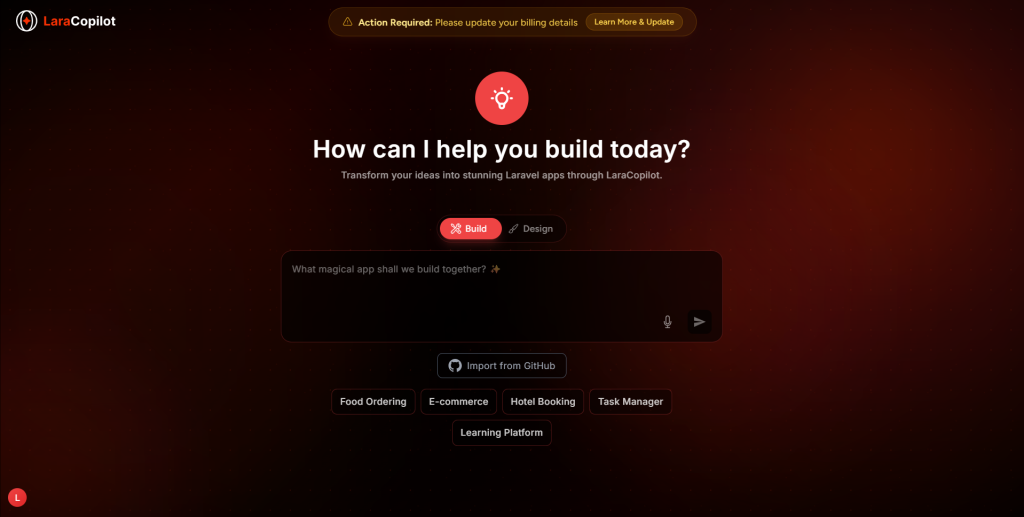
Type something like “I want a hotel booking system where users can search by date, pick a room, and pay online.” LaraCopilot takes that and starts building the Laravel backend — the logic, the database structure, the routes. You don’t need to explain how any of it works technically. You just need to know what it should do.

If you know what the app should look like — use Design Mode.

Maybe you have a Figma file. Maybe you’ve seen a product you like and want something similar. Maybe you just know the layout feels wrong and you want to fix it before writing a single line of logic. Design Mode lets you start there with the visual layer and LaraCopilot figures out how to connect it to a working Laravel app underneath.

That’s it. Two entry points. Same destination.

Why We Built This

We kept hearing two very different complaints from two very different types of users.

Founders kept saying: “I know what I want but I don’t know how to describe it technically.”

CTOs kept saying: “I know how it works technically but I need to see it before I can explain it to my team.”

Both problems are real. And they’re basically opposites. One mode was never going to fix both.

So now there are two. And you just pick the one that matches how your brain is working that day.

Quick-Start Options Help Too

If you’re not sure where to begin, you’ll notice five prompts already waiting for you — Food Ordering, E-commerce, Hotel Booking, Task Manager, Learning Platform. These aren’t just examples. They pre-load context so LaraCopilot already understands the type of app you’re building before you say anything. Your first result comes out closer to what you actually need.

Go Try It

Both modes are live right now. Open LaraCopilot, look for the toggle, and just pick whichever one feels right.

You don’t need to fully understand it before you start. That’s kind of the point.

Top 10 Tips for Using AI to Build Laravel Projects Faster

To build Laravel projects faster with AI, stop using it as a smart autocomplete and start using it as an architectural generator. Define your database schema clearly before prompting. Use AI to generate the boilerplate migrations, models, basic controllers, and admin panel in one connected session. Save your manual coding time for custom business logic, third-party integrations, and complex query optimization.

10 Rules for AI-Assisted Laravel Development

  • Define the schema first: AI needs a clear data structure to generate correct Eloquent relationships.
  • Generate full stacks, not snippets: Don’t ask for a model, then a controller. Ask for the entire CRUD stack at once.
  • Use a Laravel-native tool: Generic AI produces generic PHP. A Laravel-specific AI like LaraCopilot produces framework-correct code.
  • Automate Filament resources: Admin panels are highly repetitive. AI can build a complete Filament v3 resource from a schema description in seconds.
  • Let AI write your feature tests: Pest and PHPUnit boilerplate is tedious. Generate the test shell automatically.
  • Enforce naming conventions: Tell the AI your preferred naming rules (e.g., singular models, plural tables) if you deviate from Laravel defaults.
  • Review relationships immediately: Eloquent direction errors (hasMany vs belongsTo) are the most common AI mistake. Check foreign key placement first.
  • Keep business logic separate: Generate the structural foundation with AI, but write complex authorization or billing logic manually.
  • Use plain English for Artisan commands: Stop Googling flag combinations. Describe what you need and let AI generate the exact php artisan make command.
  • Treat AI output as a draft: Never push AI-generated code directly to production without running tests and a human code review.

Bottleneck in Laravel Development

Laravel is built for speed. Artisan commands, Eloquent, and Blade are designed to help you ship fast. But even with a great framework, starting a new project or building a major feature involves hours of unavoidable scaffolding.

Models need migrations. Migrations need controllers. Controllers need form requests. Admin panels need repetitive table columns and form fields.

The developers who are shipping faster in 2026 aren’t typing faster. They are using AI to skip the scaffolding phase entirely. But they are doing it strategically. If you use AI wrong, you spend more time fixing its mistakes than you would have spent writing the code yourself.

Here is how to do it right.

10 Proven Tips to Speed Up Your Laravel Workflow

1. Define your database schema in plain English first

AI models are text predictors. If you give them vague instructions, they guess. If you give them a clear data structure, they generate precise code. Before you ask an AI to write a Laravel feature, write down the schema.

Poor prompt: “Build a blog system.”

Better approach: “I need a Post model. Fields: title (string), slug (string, unique), body (text), published_at (timestamp). It belongs to a User and has many Comments.”

When an AI understands the exact columns and relationships, it generates the migration, model, and correct foreign keys on the first try.

2. Generate the full CRUD stack in one session

One of the biggest mistakes developers make is treating AI like an interactive Google search. They ask for a migration. Then they ask for the model. Then they ask for the controller.

This breaks the AI’s context. Instead, use a tool that understands the Laravel architecture and ask for the entire stack at once.

When using LaraCopilot, you describe the entity once, and it generates the model, migration, controller, API resource, policy, and tests as a connected package. The pieces are wired together correctly from the start.

3. Use Laravel-native AI for Laravel-specific tasks

Generic AI assistants (like ChatGPT or GitHub Copilot) are trained on every programming language. They know PHP, but they often struggle with Laravel’s strict conventions. They might generate an Eloquent relationship using an outdated method, or default to generic PHP patterns instead of Laravel helpers.

If 80% of your work is in Laravel, use a tool built for it. LaraCopilot knows the difference between Filament v2 and v3. It knows where the foreign key goes in a belongsTo relationship. You spend less time correcting convention errors.

4. Stop writing admin panels manually

Building a Filament or Nova admin panel is pure repetition. You are mapping database columns to form fields and table columns over and over again.

This is the perfect use case for AI. A strong AI generator can read your model schema and output a complete Filament resource with TextInput fields, TextColumn tables, and search filter in seconds. You review the output, tweak a few labels, and move on.

5. Let AI scaffold your test suite

Writing tests from scratch creates friction. Generating the initial test structure removes it.

Ask your AI to “Generate a Pest feature test for the PostController with coverage for index, store, and destroy methods.” The AI will build the file, import the necessary traits (RefreshDatabase), and write the basic assertions. You only need to fill in the specific business logic assertions.

6. Offload FormRequest validation

Validation rules are tedious to write but easy for an AI to infer from a database schema. If your migration has a string('title')->unique() and a text('body')->nullable(), the AI knows exactly what the FormRequest rules should be.

Generate the request class automatically and attach it to your controller. It saves five minutes per endpoint.

7. Review Eloquent relationships first

If an AI is going to make a mistake in a Laravel project, it is usually in the Eloquent relationships. Specifically, it might confuse which model holds the foreign key (e.g., putting belongsTo on the parent instead of the child).

Whenever you generate models, check the relationship methods and the migration files immediately. Fixing a misplaced foreign key before you run php artisan migrate takes seconds. Fixing it later takes much longer.

8. Use AI for Artisan command translation

Laravel has hundreds of Artisan commands with complex flag combinations. Instead of opening the documentation to remember how to create a model, migration, and invokable controller at the same time, ask the AI.

Describe what you need: “Give me the Artisan command to make a Flight model with a migration, factory, and API controller.” You get the exact command instantly.

9. Build the scaffolding with AI, build the logic by hand

AI is incredible at conventions (CRUD, routing, migrations). It is less reliable at highly specific, multi-step business logic (e.g., “If the user is on the pro plan, and they have used 80% of their credits, calculate a prorated upgrade fee based on the days left in the month”).

Generate the foundation with AI. Write the complex, differentiated logic yourself. This hybrid approach maximizes speed without risking business-critical calculations.

10. Keep your AI context clean

If you are using a chat-based AI, start a new chat for a new feature. Do not ask an AI to build a billing module in the same conversation where you were discussing user authentication two days ago. Mixed context leads to hallucinated code and crossed wires. Keep the context focused on the specific task at hand.

Ready to Code Smarter with Laravel?

Meet LaraCopilot — your AI full-stack assistant built for Laravel developers.
Skip the boilerplate, build faster, and focus on what matters: problem solving.

Try LaraCopilot Now

4 AI Mistakes That Slow Laravel Developers Down

Mistake 1: Accepting generic PHP instead of Laravel conventions.

If the AI generates raw SQL queries instead of Eloquent, or standard PHP validation instead of Laravel’s validator, do not accept it. Tell the AI to use Laravel conventions, or switch to a Laravel-native tool.

Mistake 2: Generating code without a clear database schema.

Asking for features before the database is defined guarantees messy code. Always finalize the migration structure first.

Mistake 3: Skipping code review on generated scaffolding.

AI code looks authoritative, but it can contain subtle flaws. Review generated code with the same scrutiny you would apply to a junior developer’s pull request.

Mistake 4: Trying to automate complex business logic immediately.

Start by automating the repetitive tasks (migrations, simple CRUD, admin panels). Once you trust the workflow, expand to more complex areas.

Scaffolding Framework: A Faster Workflow

If you want to adopt AI effectively in your next Laravel project, follow this three-step workflow:

1. The Definition Phase: Write out your entities, fields, and relationships in plain English.

2. The Generation Phase: Paste that definition into LaraCopilot. Generate the models, migrations, controllers, Filament resources, and policies in one connected session. Push it to GitHub.

3. The Differentiated Phase: Pull the code. Run the migrations. Spend the rest of your day writing the specific business logic that makes your app unique.

When you separate the boilerplate from the business logic, you realize how much time you were wasting on the boilerplate.

Conventions Are a Commodity

Most developers view AI as a pair programmer that helps them type faster. That is a limited view.

In a highly opinionated framework like Laravel, conventions are a commodity. The way a controller returns a resource, the way a policy checks authorization, the way a migration creates a table, these are solved problems. There is no strategic advantage to writing them by hand in 2026.

The real advantage of AI is not typing speed. It is energy preservation. By offloading the commodity work to an AI generator, you save your cognitive energy for the architecture, the user experience, and the complex logic that actually dictates whether the project succeeds or fails.

Developers who understand this are not just building faster; they are building better, because they are spending their time on the right problems.

Manual Scaffolding vs AI-First Workflow

Manual ScaffoldingAI-First Workflow
Write migrations field by fieldMigrations generated from plain English schema
Build models and relationships separatelyConnected models and relationships generated together
Manually map Filament form fieldsAdmin panel fields inferred from database columns
Write Pest test boilerplate by handTest shells generated with the feature
Hours spent setting up basic CRUDCRUD foundation completed in minutes

Ready to Code Smarter with Laravel?

Meet LaraCopilot — your AI full-stack assistant built for Laravel developers.
Skip the boilerplate, build faster, and focus on what matters: problem solving.

Try LaraCopilot Now

Wrap-up!

Using AI to build Laravel projects faster is about strategically offloading repetitive tasks. By defining clear database schemas and using a Laravel-native AI generator, developers can skip the manual creation of migrations, Eloquent relationships, controllers, and Filament resources. Generating the full connected stack at once eliminates the biggest bottleneck in web development scaffolding allowing developers to focus their time and energy purely on custom business logic and user experience.

Your time is too valuable to spend writing the same Eloquent models and Filament resources over and over again. Describe what you want to build, and let a Laravel-native AI generate the foundation for you.

Try LaraCopilot Free

LaraCopilot vs GitHub Copilot for Laravel: 2026 Full Comparison

If you build Laravel every week, GitHub Copilot can feel helpful right up until it gives you generic PHP when you needed Laravel-native code. That gap is exactly why developers searching for laracopilot vs github copilot are usually not asking which AI tool is more famous — they are asking which one actually understands Eloquent, Artisan, policies, resources, and real Laravel workflows.

After using both in Laravel-heavy scenarios, the pattern is simple: GitHub Copilot is stronger as a broad, general-purpose coding assistant, while LaraCopilot is stronger when the work is specifically Laravel. If you are already seeing generic suggestions, manual cleanup, or framework-level rework, that is usually the signal that a specialist tool will outperform a generalist one.

This is also the same pattern behind why many general AI tools struggle with Laravel-specific output in the first place, which we broke down in Why AI Tools Fail Laravel. And if you want the short version of LaraCopilot’s product philosophy before the full comparison, read What Is LaraCopilot?.

Quick verdict

For Laravel-first developers, LaraCopilot is the better choice.

For polyglot developers who move between JavaScript, TypeScript, Python, Go, and PHP all day, GitHub Copilot is still a very strong option.

That is the real answer. Most comparison posts hide behind “it depends,” but here the split is clean:

  • Choose LaraCopilot if most of your work is Laravel.
  • Choose GitHub Copilot if Laravel is only one part of a much broader stack.
  • Choose LaraCopilot fastest if your pain is Eloquent accuracy, Artisan conventions, CRUD scaffolding, policy generation, admin panels, or shipping full Laravel flows faster.
  • Stay with GitHub Copilot if your main value comes from IDE-native assistance across many languages and repositories.

What makes this comparison different

Most AI tool comparisons compare features on a landing page. That is not useful.

The real question is what happens when you ask both tools to do Laravel work that matters:

  • Generate a CRUD flow with proper Laravel structure.
  • Create Eloquent models and relationships.
  • Build API resources and controllers.
  • Add authorization policies.
  • Follow Laravel conventions without hand-holding.
  • Fit into a team workflow that still needs speed and reviewability.

That is also why this comparison connects closely with How LaraCopilot Generates Production-Grade Laravel Code and Laravel AI Code Generator: 6 Steps to Production. The product is not trying to win at every coding task. It is trying to win where Laravel developers lose the most time.

Biggest difference: general AI vs Laravel-native AI

GitHub Copilot is built to serve a very broad developer audience. Officially, GitHub offers Copilot Free, Pro, Pro+, Business, and Enterprise plans, with features spanning chat, coding agent workflows, agent mode, inline suggestions, and centralized controls for teams.

That breadth is its strength. It is also its weakness for Laravel-heavy work.

When a tool is built for many languages and many frameworks, it usually helps most at the syntax and autocomplete layer. But Laravel development is not mainly a syntax problem. It is a conventions problem. It is a structure problem. It is a workflow problem. It is knowing when to use an Eloquent relationship, how policies fit into authorization, when a resource should exist, how an admin panel should be scaffolded, and what “Laravel-correct” actually looks like.

That is why LaraCopilot tends to win when the task is framework-specific instead of language-generic. The same logic shows up in Laravel Development Before vs After AI and Laravel Development Workflow with LaraCopilot: the value is not just faster code, but less Laravel cleanup after generation.

Side-by-side: where each tool wins

CategoryLaraCopilotGitHub Copilot
Laravel conventionsStrongerGood, but often generic
Eloquent relationshipsStrongerCan require correction
Artisan-aware workflowsStrongerLimited framework intuition
CRUD scaffoldingStrongerSnippet-level help
API resources and policiesStrongerMixed, depends on prompting
Polyglot codingWeakerStronger
IDE-native ubiquityWeakerStronger
Team-wide GitHub ecosystem fitGoodStronger for broad org usage
Best fitLaravel-first teamsMulti-language developers

The simplest way to think about it is this: LaraCopilot behaves more like a Laravel specialist, while GitHub Copilot behaves more like a very capable general software assistant.

Real Laravel task 1: CRUD generation

CRUD work is where the gap becomes obvious fastest.

A mid-level Laravel developer does not just need “a controller.” They need the full shape of the work:

  • Model
  • Migration
  • Validation
  • Controller
  • Resource
  • Policy
  • Routes
  • Often tests

GitHub Copilot can absolutely help write parts of this flow. But it usually helps one file or one local task at a time. That is useful if you already know the exact structure you want and do not mind stitching the pieces together yourself.

LaraCopilot is stronger when the goal is the Laravel workflow itself. If your intent is “build the feature correctly and keep moving,” it tends to match the way Laravel developers actually ship.

Real Laravel task 2: Eloquent models and relationships

This is where many developers start doubting general-purpose AI output.

Laravel developers do not just need classes and methods. They need the right relationship type, clear naming, framework-correct structure, and code that matches the rest of the application. A generic PHP answer may look fine at first glance and still be wrong in the places that matter.

That is why if your pain point is “GitHub Copilot gives generic PHP,” the real issue is usually Eloquent and Laravel conventions. This is also the core argument behind Laravel AI Development Myths and AI Expectations vs Reality in Laravel Development: AI feels impressive until framework correctness matters.

For a Laravel developer, getting the first 80% fast is nice. Getting the last 20% wrong is expensive.

Real Laravel task 3: API resources, policies, and framework structure

Senior developers usually stop trusting a tool when it produces code that is superficially correct but structurally wrong.

That is what happens a lot with Laravel-specific layers like:

  • API resources
  • Request validation
  • Authorization policies
  • Route organization
  • Framework-native naming and placement

GitHub Copilot can produce helpful drafts here, especially when the developer gives strong context and already knows what the output should look like. But that means the developer is still doing a significant amount of architecture steering and framework correction.

LaraCopilot’s advantage is not that it removes the senior developer. It is that it removes more of the repetitive Laravel assembly around the senior developer. That is a very different value proposition, and it lines up with AI Won’t Replace Laravel Developers and LaraCopilot Replace Junior Developers?. The winning workflow is not “AI instead of developers.” It is “AI for the repetitive framework work, developers for the high-judgment decisions.”

Ready to Code Smarter with Laravel?

Meet LaraCopilot — your AI full-stack assistant built for Laravel developers.
Skip the boilerplate, build faster, and focus on what matters: problem solving.

Try LaraCopilot Now

Developer experience: who each tool feels best for

Mid-level Laravel developers

Mid-level developers usually want two things at once:

  • More speed
  • Less risk of being subtly wrong

That is exactly where LaraCopilot tends to feel better. It reduces the amount of Laravel-specific guessing. Instead of asking, “Did this AI output really follow Laravel conventions?” the developer can move faster with more confidence.

Senior Laravel developers

Senior developers care less about flashy output and more about whether the tool creates review debt.

If the tool saves 20 minutes but creates 40 minutes of cleanup, it is a bad trade. That is why senior Laravel developers often prefer specialist tools when the stack is concentrated. LaraCopilot is stronger when the goal is leverage without framework drift.

Freelance Laravel developers

Freelancers usually care about delivery speed, repeatability, and fewer surprises in client work.

That makes Laravel-specific generation much more valuable than general-purpose suggestion quality. If you bill for outcomes, not keystrokes, a tool that shortens Laravel scaffolding and reduces correction time usually wins harder than a tool that helps across many languages you barely touch.

Pricing: what GitHub Copilot officially costs

GitHub says Copilot Pro costs $10 per month or $100 per year, Copilot Pro+ costs $39 per month or $390 per year, Copilot Business costs $19 per user per month, and Copilot Enterprise costs $39 per user per month.

GitHub also says Copilot Free includes limited access, with 50 premium requests per month, while Pro includes 300 premium requests per month and Pro+ includes 1,500 premium requests per month.

GitHub positions Pro for individuals, Pro+ for power users who want broader model access, Business for organizations with centralized management, and Enterprise for larger organizations that need additional enterprise-grade capabilities.

That pricing is reasonable for a general coding assistant. But the buying decision for Laravel developers should not be made on monthly price alone. It should be made on rework cost.

If GitHub Copilot gives you output that still needs Laravel correction, then the real cost is not just the subscription. It is the subscription plus the cleanup time. That is why ROI matters more than sticker price, especially for agencies and freelancers. You can see that logic applied more broadly in AI in Laravel Development Costs.

Team workflows: where GitHub Copilot stays strong

GitHub Copilot has a major advantage for organizations already deep inside the GitHub ecosystem. GitHub’s official plan documentation highlights centralized management and policy control for Business and Enterprise customers, plus broader organizational capabilities in higher tiers.

That matters for companies running many repositories, many languages, and many developers.

But for Laravel-heavy teams, “better organizational tooling” is not always the same as “better Laravel output.” Those are different decisions. If your team mainly builds Laravel products, output quality on Laravel tasks may matter more than a broad enterprise feature list.

The right question is not “Which tool has more global features?” It is “Which tool makes our Laravel team faster with less review drag?”

When you should stay with GitHub Copilot

You should probably stay with GitHub Copilot if:

  • You work across multiple languages every day.
  • Laravel is only a small portion of your week.
  • You care more about broad IDE assistance than framework-specific correctness.
  • Your company already standardized on GitHub Copilot across many teams and stacks.
  • Your current pain is not Laravel conventions but general coding productivity.

In that context, GitHub Copilot is doing what it was built to do.

When you should switch to LaraCopilot

You should seriously consider switching if:

  • Most of your paid work is Laravel.
  • You are tired of fixing generic PHP suggestions.
  • Eloquent accuracy matters.
  • You want faster CRUD, API, and policy generation.
  • You care about Laravel workflow speed more than cross-language breadth.
  • You are a freelancer or agency where cleanup time directly hurts margin.
  • You want a tool that behaves like it understands Laravel, not just PHP.

That is especially true if your current workflow still involves generating code, then manually forcing it back into Laravel shape. At that point, the tool is helping but not enough.

Ready to Code Smarter with Laravel?

Meet LaraCopilot — your AI full-stack assistant built for Laravel developers.
Skip the boilerplate, build faster, and focus on what matters: problem solving.

Try LaraCopilot Now

Final verdict

If your job is mostly Laravel, LaraCopilot wins this comparison.

If your job is many languages and many frameworks, GitHub Copilot remains a strong general-purpose default.

That is the cleanest honest answer for laracopilot vs github copilot in 2026. One tool is broader. The other is sharper. And for Laravel developers, sharper usually wins.

Switch when Laravel correctness matters

If 70% or more of your work is Laravel, the better question is not “Which AI tool is more popular?” It is “Which one gives me less framework cleanup?”

LaraCopilot is built for that exact problem.

→ Start with LaraCopilot

How LaraCopilot Cuts Laravel Delivery Risk by 80%

LaraCopilot reduces Laravel delivery risk by combining AI-assisted code generation with architecture validation, workflow enforcement, and predictable build patterns. Instead of just speeding up coding, it ensures teams ship Laravel products faster without introducing technical debt, delays, or rework cycles.

Real Reason Laravel Projects Slip

Laravel projects don’t fail because teams can’t code.

They fail because delivery becomes unpredictable.

Why This Topic Matters If You Own the Product

Right now, SaaS CEOs are facing a strange paradox:

Development is faster than ever (thanks to AI).

Yet delivery timelines are less reliable.

Most AI tools generate code.

They don’t manage delivery discipline.

That’s where the real risk hides.

The issue isn’t writing controllers or migrations.

It’s:

  • Rebuilding features after AI-generated shortcuts
  • Refactoring messy outputs
  • Fixing architecture drift
  • Managing inconsistent developer patterns
  • Watching MVP timelines slip… again

This is why many CEOs are skeptical of Laravel AI builders.

Speed without control is just chaos delivered faster.

LaraCopilot was designed to solve that exact gap.

What Laravel Delivery Risk Really Is

Let’s break down what “Laravel delivery risk” actually means.

Delivery risk is not a coding problem.

It’s a systems problem made up of:

  • Misaligned architecture decisions
  • Inconsistent coding patterns across developers
  • Rework caused by AI-generated quick fixes
  • Missed edge cases discovered late
  • Unpredictable sprint outcomes
  • Scaling problems introduced during the MVP phase

Traditional Laravel AI generators focus on:

“Generate this feature.”

LaraCopilot focuses on:

“Deliver this product safely, predictably, and fast.”

Think of it like this:

Most AI tools are fast typists.

LaraCopilot acts like a senior Laravel architect embedded into delivery.

How LaraCopilot Builds Predictable Laravel Delivery

It operates across three layers:

  • Guided Generation: structured Laravel code creation
  • Architectural Guardrails: enforces clean patterns automatically
  • Delivery Intelligence: prevents rework loops before they happen

This is why it’s closer to a Laravel AI MVP builder than a basic code generator.

Step-by-Step: How LaraCopilot Reduces Risk

Step 1: Structured Project Initialization

Instead of starting with a blank repo:

  • A predefined SaaS-ready Laravel architecture is applied
  • Domain logic boundaries are enforced early
  • Scaling assumptions are baked in

Result: No architectural rewrites later.

Step 2: AI Generation Within Guardrails

LaraCopilot doesn’t allow “freeform vibe coding.” It generates:

  • Controller logic aligned to domain structure
  • Validated relationships and migrations
  • Policy-driven authorization patterns
  • Predictable service-layer separation

Result: AI output remains production-grade.

Step 3: Continuous Validation During Build

While features are generated:

  • Conflicts are detected early
  • Duplicate logic is prevented
  • Pattern drift is flagged
  • Dependency misuse is corrected

Result: No silent technical debt accumulation.

Step 4: Delivery-Oriented Feature Assembly

Instead of coding feature by feature, LaraCopilot assembles features as deployable units.

This means:

  • Reduced QA surprises
  • Faster staging readiness
  • Predictable sprint closures

Optional Advanced Step: AI-Assisted Refactor Prevention

Unlike traditional Laravel AI code generators, LaraCopilot:

  • Prevents anti-patterns before they exist
  • Eliminates the need for post-MVP cleanup sprints

Where Laravel Teams Accidentally Add Risk

  • Using Generic AI Tools for Laravel Projects
    Fix: Use tools trained on Laravel delivery workflows, not general-purpose coding.
  • Prioritizing Speed Over Structure
    Fix: Delivery speed comes from consistency, not shortcuts.
  • Treating AI as a Junior Developer
    Fix: AI must behave like a senior system enforcer.
  • Building MVPs That Can’t Scale
    Fix: MVP architecture must assume production realities.
  • Allowing “Vibe Coding” in Core Systems
    Fix: Creative coding belongs in prototypes, not SaaS infrastructure.
  • Measuring Output Instead of Predictability
    Fix: CEOs need forecastable delivery, not just fast commits.

Ready to Code Smarter with Laravel?

Meet LaraCopilot — your AI full-stack assistant built for Laravel developers.
Skip the boilerplate, build faster, and focus on what matters: problem solving.

Try LaraCopilot Now

Myths About AI and Laravel Delivery

Myth: AI Builders Replace Developers

Reality: They reduce coordination overhead and rework cycles.

Myth: Faster Code Means Faster Delivery

Reality: Unstructured speed causes downstream delays.

Myth: Laravel Is Already Fast Enough

Reality: Laravel is productive, but delivery systems still break.

Myth: MVPs Don’t Need Strong Architecture

Reality: Most SaaS failures begin with MVP shortcuts.

Myth: AI Code Generators Solve Engineering Bottlenecks

Reality: They often move the bottleneck to QA and refactoring.

SAFE Delivery Framework for Laravel

To understand LaraCopilot’s approach, think in terms of:

SAFE = Structured – Aligned – Fast – Error-Resistant

Structured: Every feature is generated within Laravel-native architecture rules.

Aligned: Code stays consistent across teams, contributors, and sprints.

Fast: Speed comes from eliminating backtracking, not rushing creation.

Error-Resistant: Guardrails reduce defects before they enter QA pipelines.

When to Use SAFE Delivery Thinking

  • Building SaaS MVPs with investor timelines
  • Scaling internal platforms
  • Rebuilding legacy Laravel systems
  • Launching multi-tenant products
  • Expanding engineering teams quickly

What This Looks Like in Real Laravel Teams

Scenario 1 — SaaS Founder Launching an MVP

Before LaraCopilot:

  • 14-week roadmap slipped to 22 weeks
  • Constant refactors
  • Conflicting developer styles After LaraCopilot:
  • Predictable 10-week delivery
  • No architectural rewrites
  • Immediate production-readiness

Scenario 2 — Scaling Product Team

Challenge: New hires introduced inconsistent Laravel patterns.

LaraCopilot Outcome:

AI enforced project conventions automatically.

Onboarding time reduced drastically.

Code reviews shifted from policing to improving.

Scenario 3 — Rebuilding a Delayed Platform

Problem: Existing AI-generated codebase became unmaintainable.

Solution: LaraCopilot re-established:

  • Domain structure
  • Clean service boundaries
  • Predictable deployment cycles
    Result: Delivery risk dropped dramatically.

Why LaraCopilot Is Not Just Another Laravel AI Tool

The market assumes Laravel AI tools are about writing code faster. That’s a red ocean.

The real opportunity is making software delivery predictable again.

99% of tools optimize keystrokes.

Almost none optimize confidence in shipping.

LaraCopilot isn’t competing with AI code generators.

It’s creating a new category:

AI-Assisted Delivery Infrastructure for Laravel.

That’s why CEOs, not just developers, are the real users.

Practical Delivery Tools for CEOs and CTOs

CEO Delivery Risk Checklist

Ask your team:

  • Do we rewrite features after AI generates them?
  • Are sprint timelines predictable?
  • Does every developer follow identical Laravel patterns?
  • Is MVP code production-ready or temporary?
  • Can we forecast releases confidently? If two or more answers are “No,” delivery risk exists.

What LaraCopilot Replaces

Traditional ProcessLaraCopilot Approach
Manual scaffoldingIntelligent structured generation
Code review policingBuilt-in guardrails
Late QA discoveriesEarly validation
Architecture debatesPre-aligned patterns
Refactor sprintsClean-first builds

Why LaraCopilot Changes Laravel Delivery

Laravel development isn’t slow, unstructured delivery is.

LaraCopilot changes the equation by combining AI acceleration with architectural discipline, allowing SaaS teams to move fast and ship confidently.

Instead of trading safety for speed, it builds both into the delivery system, turning Laravel from a productive framework into a predictable growth engine.

If you’re planning a SaaS launch or stuck in delayed development cycles, talk to the LaraCopilot team to see how we can stabilize and accelerate delivery.

Ready to Code Smarter with Laravel?

Meet LaraCopilot — your AI full-stack assistant built for Laravel developers.
Skip the boilerplate, build faster, and focus on what matters: problem solving.

Try LaraCopilot Now

Why We Built a Laravel Copilot for Teams

A Laravel Copilot is an AI coding assistant built specifically for Laravel teams to generate framework-aware code, reduce technical risk, and improve development speed without sacrificing trust or control.

We built LaraCopilot because generic AI tools were optimizing for speed, while SaaS companies actually needed confidence.

Speed Is Easy. Trust Is Hard.

Every CEO hears the same promise today:

“AI will make your developers 10x faster.”

But almost no one tells you what happens after the AI ships questionable code into production.

Speed without trust creates a new bottleneck — fear.

  • Fear of silent security flaws
  • Fear of unmaintainable code
  • Fear of AI hallucinations
  • Fear of compliance exposure
  • Fear of losing engineering standards

And when fear enters the workflow, teams slow down again.

So the real question became:

What if the future of AI development isn’t faster coding… but safer acceleration?

That question is why LaraCopilot exists.

What CEOs Are Actually Worried About

When we spoke to SaaS CEOs, the conversation was surprisingly consistent.

Not:

“How fast can AI generate code?”

But:

“Can I trust what it writes?”

Because CEOs don’t optimize for code output.

They optimize for:

  • Predictable delivery
  • Platform stability
  • Security posture
  • Engineering culture
  • Long-term maintainability

Here’s the uncomfortable truth most AI vendors won’t say:

Generic AI coding assistants are built for developers. Vertical copilots are built for businesses.

And businesses carry risk.

Problem No One Talks About: AI Trust Gap

AI adoption is not being blocked by capability.

It’s being blocked by confidence.

Hidden Executive Calculation

Every CEO subconsciously asks:

“Will this tool create more risk than velocity?”

If the answer is unclear, adoption stalls.

Where Generic AI Tools Fall Short

Most AI coding assistants are trained broadly.

That sounds powerful…

Until context matters.

Example:

Ask a generic AI tool to scaffold a Laravel authentication flow.

You might get:

  • Outdated patterns
  • Weak authorization checks
  • Non-Laravel conventions
  • Poor dependency structure

Your senior engineers now have to review everything anyway.

So instead of replacing friction…

You’ve relocated it.

AI capability is no longer the bottleneck.

Trust is the new adoption barrier.

Framework awareness is becoming non-negotiable.

When We Stopped Thinking Like Tool Builders

We realized something critical:

AI is moving from horizontal → vertical.

Just like SaaS did.

Remember when companies used one massive ERP for everything?

Then came specialized tools:

  • Salesforce for CRM
  • Stripe for payments
  • HubSpot for marketing

AI is entering the same phase.

Generic copilots will remain useful.

But high-performing teams will migrate toward context-aware AI.

Because context reduces risk.

Why Laravel Needed Its Own Copilot

Laravel is not just another framework.

It has:

  • Opinionated architecture
  • Elegant syntax
  • Strong conventions
  • Rapid release cycles
  • Massive SaaS adoption

Yet most Laravel AI tools treat it like “just PHP.”

That mismatch creates subtle technical debt.

So we asked:

What would an AI coding assistant look like if it actually understood Laravel?

That question became LaraCopilot.

Horizontal AI increases output.

Vertical AI increases reliability.

Reliability is what executives buy.

What Makes a True Laravel Copilot Different?

Let’s remove the marketing noise.

A real Laravel Copilot should behave less like autocomplete…

…and more like a senior Laravel engineer sitting beside your team.

Core Principles We Built Around

1. Framework Awareness

Not PHP-first.

Laravel-first.

Meaning the assistant understands:

  • Service container patterns
  • Eloquent relationships
  • Middleware architecture
  • Queue systems
  • Policies & gates
  • Testing conventions

This drastically reduces rewrite cycles.

2. Transparency Over Magic

We deliberately avoided the “black box” experience.

Teams should know:

  • Why code was suggested
  • What pattern it follows
  • Where risks may exist

Opacity kills trust.

Clarity scales adoption.

3. Team-Level Intelligence (Not Solo Developer AI)

Most AI tools optimize for individuals.

But SaaS performance is a team sport.

LaraCopilot was built to align with:

  • shared repositories
  • review workflows
  • engineering standards
  • architectural direction

Because one rogue AI-generated pattern can ripple across your codebase.

4. Governance-Ready AI

Executives increasingly ask:

“Can we control how AI is used?”

So we engineered for:

  • policy alignment
  • review visibility
  • controlled usage

Not chaos-driven experimentation.

A Laravel Copilot should deliver:

  • Context
  • Clarity
  • Control
  • Consistency

Speed is just the byproduct.

Next AI Category Is “Trust Infrastructure”

Most vendors are fighting inside the same red ocean:

“Our AI writes more code than theirs.”

But the real category that will dominate this decade is:

AI Trust Infrastructure

Tools designed to answer one executive question:

“Can this scale safely inside my company?”

Vertical AI like LaraCopilot sits at the center of that shift.

Because the future isn’t AI everywhere.

It’s AI you can rely on.

Where the AI Market Is Quietly Expanding

Companies that avoided AI due to risk…

Will adopt rapidly once trust improves.

Meaning the AI market is far larger than current adoption suggests.

We are still early.

Very early.

Mistakes CEOs Make When Evaluating AI Coding Assistants

Mistake 1: Optimizing Only for Developer Excitement

Developers love new tools.

Executives must evaluate operational impact.

Mistake 2: Ignoring Framework Context

Framework-agnostic AI often creates hidden refactoring costs.

Mistake 3: Treating AI Like a Plugin

AI is becoming infrastructure not a side tool.

Mistake 4: Underestimating Cultural Impact

AI changes:

  • review habits
  • architecture decisions
  • coding standards

Leadership must guide this shift.

Don’t ask:

“Is the AI impressive?”

Ask:

“Is it dependable at scale?”

Expert Guide: Top 9 Laravel AI Tools Every Developer Should Know in 2025

How to Decide If Your SaaS Team Needs a Laravel Copilot

Follow this quick executive checklist:

You likely need one if:

  • Your team ships Laravel features weekly
  • Senior engineers spend time correcting AI output
  • Consistency matters across repositories
  • Security is non-negotiable
  • You want AI adoption without engineering anxiety

If three or more hit, the ROI conversation is already relevant.

TRUST Framework for Adopting AI Safely

Here’s a simple model we use internally.

T — Train on Context

Use AI that understands your framework.

R — Reveal Logic

Avoid black-box suggestions.

U — Unify Teams

AI must align with shared standards.

S — Set Governance

Define usage boundaries early.

T — Track Impact

Measure productivity and code health.

Trust is engineered not hoped for.

So… Why Did We Really Build LaraCopilot?

Because we saw a future where:

  • AI writes most boilerplate
  • Engineers focus on architecture
  • Teams ship faster without chaos

But that future only happens if leaders feel safe enabling it.

LaraCopilot is our answer to that leadership problem.

Not just a developer tool.

A confidence layer.

Wrap-up!

The future of AI development will not be defined by raw speed, it will be defined by trust. As SaaS companies move from experimentation to operational AI, framework-aware assistants like LaraCopilot represent a shift toward safer, scalable adoption. Because in the end, executives don’t invest in AI that merely writes code, they invest in AI they can rely on.

If you’re exploring a Laravel Copilot for your team, the best way to understand the difference is to see how it works inside a real workflow.

Request a walkthrough of LaraCopilot and evaluate whether trust-first AI fits your engineering strategy.

How Laravel Copilot Fits Into Real Team Workflows

TL;DR

  • Laravel Copilot (LaraCopilot) integrates into existing Laravel workflows as a code-generating and task-assisting layer, not a replacement for developers or processes.
  • It works best when used for scaffolding, repetitive tasks, and first drafts, while humans retain ownership of architecture, reviews, and releases.
  • Real teams succeed by placing LaraCopilot at three points: planning, implementation, and QA.
  • Clear guardrails, PR reviews, security checks, and coding standards are required for safe production use.

Things to Know About LaraCopilot

A Laravel-focused AI development assistant that generates backend and frontend code, database schemas, and application scaffolding from structured prompts. It is designed to accelerate delivery inside established Laravel team workflows by automating repetitive implementation tasks.

We will explains how LaraCopilot fits into real SaaS team workflows, step by step.

Related Concepts to Know About Development

  • Laravel – A PHP web application framework used for building SaaS products.
  • CI/CD – Continuous Integration and Continuous Deployment pipelines for automated testing and releases.
  • Pull Request (PR) – A code review mechanism used before merging changes.
  • SDLC (Software Development Lifecycle) – Plan → Build → Test → Deploy → Maintain.
  • Scaffolding – Automatically generated project structure or boilerplate code.

What does “Laravel Copilot in a real workflow” actually mean?

It means LaraCopilot operates inside your existing SDLC, not alongside it.

In practical terms:

  • Product requirements are still written by humans.
  • Architecture decisions are still owned by senior engineers.
  • Code still flows through branches, PRs, tests, and deployments.

LaraCopilot simply accelerates specific implementation stages.

It does not replace:

  • Sprint planning
  • Code review
  • QA ownership
  • Release management

It replaces or reduces:

  • Manual CRUD setup
  • Repetitive controller/model creation
  • Basic validation logic
  • First-pass UI scaffolding

Where does LaraCopilot sit in a standard Laravel workflow?

A typical SaaS Laravel workflow looks like this:

  1. Requirements defined
  2. Tasks created
  3. Code implemented
  4. PR reviewed
  5. Tests run
  6. Deployment

LaraCopilot fits mainly into Step 3, with supporting roles in Steps 1 and 4.

StageHuman-ownedLaraCopilot-assisted
PlanningRequirements, acceptance criteriaFeature breakdown drafts
ImplementationArchitecture, business logicControllers, models, migrations
ReviewPR approvalCode explanation
QATest strategyTest case generation
ReleaseDeploymentNone

How teams typically use LaraCopilot during planning

LaraCopilot is not a product manager. It supports planning by structuring ideas into implementable tasks.

Common planning uses

  • Convert feature descriptions into Laravel components
  • Draft API endpoint lists
  • Generate migration outlines
  • Suggest model relationships

Example

Input:

Build user subscriptions with Stripe.

Output:

  • Users table update
  • Subscriptions table
  • BillingController
  • Webhook endpoint
  • Middleware for active plans

This becomes Jira or Linear tasks.

Humans still decide scope and priority.

Expert Read: Build Laravel Apps in Minutes using AI

How LaraCopilot is used during implementation

This is where most value appears.

Developers prompt LaraCopilot to generate:

  • Models
  • Migrations
  • Controllers
  • Form requests
  • Vue/Blade scaffolding
  • API resources

Typical flow

Step 1: Developer defines intent

Example:

Create a Project model with owner relationship and REST API.

Step 2: LaraCopilot generates structure

  • Project.php
  • migration
  • ProjectController
  • routes
  • validation rules

Step 3: Developer refines logic

Engineers adjust:

  • Authorization policies
  • Domain rules
  • Performance concerns

LaraCopilot provides baseline code, not production judgment.

Ready to Code Smarter with Laravel?

Meet LaraCopilot — your AI full-stack assistant built for Laravel developers.
Skip the boilerplate, build faster, and focus on what matters: problem solving.

Try LaraCopilot Now

How LaraCopilot fits into pull requests and reviews

LaraCopilot-generated code must pass the same gates as human-written code.

Required controls

  • PR reviews
  • Static analysis
  • Linting
  • Unit tests
  • Security scans

No exceptions.

Many teams also require:

  • Explicit labeling of AI-generated commits
  • Mandatory senior review for Copilot-heavy PRs

This ensures accountability stays with humans.

How QA teams use LaraCopilot

QA does not disappear.

Instead, LaraCopilot assists by generating:

  • PHPUnit test skeletons
  • API test cases
  • Edge-condition scenarios

Example QA usage

Prompt:

Generate tests for user role permissions.

Output:

  • Admin access test
  • Unauthorized user test
  • Role downgrade test

QA engineers still validate coverage.

How LaraCopilot integrates with CI/CD

LaraCopilot does not deploy code.

It outputs files that flow into your existing pipeline:

  • GitHub Actions
  • GitLab CI
  • Bitbucket Pipelines

CI/CD remains unchanged.

LaraCopilot simply feeds code into it.

Who should use LaraCopilot in a SaaS team?

Primary users:

  • Backend Laravel developers
  • Full-stack engineers
  • Tech leads

Secondary beneficiaries:

  • CTOs (velocity visibility)
  • Product managers (faster prototypes)
  • QA leads (test scaffolding)

It is most effective in teams that already practice:

  • Code reviews
  • Automated testing
  • Clear sprint ownership

When LaraCopilot is most relevant

LaraCopilot fits best when:

  • Teams build CRUD-heavy SaaS features
  • Startups need rapid MVP iteration
  • Engineering bandwidth is limited
  • Standard Laravel conventions are followed

It is less effective when:

  • Projects rely on heavy custom architecture
  • Legacy codebases lack tests
  • Teams skip reviews

Limitations and edge cases

LaraCopilot does not:

  • Understand your business context deeply
  • Make architectural tradeoffs
  • Detect subtle security flaws
  • Replace senior engineering judgment

Common failure modes:

  • Over-generated boilerplate
  • Incorrect assumptions about relationships
  • Missing edge validation

This is why review gates matter.

Read More: Future of Laravel: From Artisan to AI Engineers

How CTOs maintain workflow clarity with LaraCopilot

Successful teams define explicit rules:

Governance checklist

  • AI-generated code must be reviewed
  • Security-sensitive areas require manual implementation
  • Production merges require human approval
  • Copilot is forbidden from managing secrets

These policies prevent tool confusion and preserve accountability.

How LaraCopilot differs from generic AI coding tools

Generic copilots optimize for individual productivity.

LaraCopilot is built around Laravel team delivery.

It aligns with conventions used in Laravel projects and supports structured SaaS workflows rather than ad-hoc coding.

LaraCopilot is developed by ViitorCloud Technologies as a Laravel-first engineering assistant.

Practical example: Feature delivery with LaraCopilot

Feature: Team invitations

Workflow:

  1. PM writes requirement
  2. Developer prompts LaraCopilot:
    • InviteController
    • invites table
    • email notification
  3. Developer edits logic
  4. Tests generated
  5. PR reviewed
  6. CI runs
  7. Feature deployed

Time saved: mostly in scaffolding.

Decision ownership: unchanged.

Must Read: ROI of AI Development: How LaraCopilot Saves 80% Build Time

Wrap-up!

LaraCopilot fits into real Laravel workflows as a structured implementation accelerator.

It supports:

  • Planning breakdowns
  • Code scaffolding
  • Test generation

It does not replace:

  • Architecture decisions
  • Code reviews
  • QA ownership
  • Deployment control

For CTOs and CEOs, its value is workflow clarity: faster delivery without sacrificing engineering discipline. Try LaraCopilot today.

Ready to Code Smarter with Laravel?

Meet LaraCopilot — your AI full-stack assistant built for Laravel developers.
Skip the boilerplate, build faster, and focus on what matters: problem solving.

Try LaraCopilot Now

3 Reasons AI Won’t Replace Laravel Developers

Laravel developers are software engineers who design, build, test, and maintain applications using the Laravel PHP framework, with responsibility for system architecture, business logic, integrations, security, deployment, and long term product evolution.

We will explains why artificial intelligence does not replace Laravel developers, even as AI tools increasingly assist with coding tasks.

Key Terms in Laravel Engineering

  • Artificial intelligence (AI): Software systems that generate code, text, or predictions based on learned patterns.
  • AI coding assistants: Tools that autocomplete, generate, or refactor code.
  • Product engineering: Translating business requirements into reliable, scalable software systems.
  • System architecture: High level design of application components and data flow.
  • Technical ownership: Accountability for software quality, performance, and outcomes.

TL;DR

  • AI generates code, but Laravel developers make engineering decisions.
  • AI lacks business context, architectural responsibility, and accountability.
  • Founders still need Laravel developers to turn ideas into production SaaS systems.
  • AI changes developer workflows, not developer relevance.
  • The role shifts from typing code to owning product execution.

We will explains why AI does not replace Laravel developers, focusing on practical engineering realities for SaaS founders.

What does “AI replacing Laravel developers” actually mean?

In practical terms, “AI replacing Laravel developers” implies that an automated system could independently:

  • Design application architecture
  • Translate business requirements into features
  • Implement secure, scalable backend logic
  • Integrate third party services
  • Debug production issues
  • Maintain and evolve a SaaS product over time

Today’s AI systems cannot perform this full lifecycle.

They generate code fragments. They do not own systems.

Laravel developers own systems.

Reason 1: AI writes code, Laravel developers build systems

AI tools operate at the code snippet level.

Laravel developers operate at the system level.

This distinction matters.

What AI can do

AI can:

  • Generate controllers, models, and routes
  • Suggest database schemas
  • Write basic CRUD logic
  • Explain framework syntax

These are isolated tasks.

What Laravel developers do

Laravel developers:

  • Design domain models aligned with business logic
  • Decide how data flows between services
  • Structure applications for maintainability
  • Enforce security boundaries
  • Optimize performance
  • Manage deployments and environments

These are connected decisions.

A SaaS product is not a collection of files. It is an interconnected system.

AI has no understanding of:

  • Your revenue model
  • Your customer workflows
  • Your compliance requirements
  • Your operational constraints

Only humans connect these layers.

Cause and effect

  • AI outputs code without understanding outcomes.
  • Developers design systems with responsibility for outcomes.

This is why AI cannot replace Laravel developers.

Reason 2: AI has no business context or product accountability

Laravel developers work inside business constraints.

AI does not.

Founders operate with real world variables

Every SaaS founder deals with:

  • Changing product requirements
  • Customer feedback loops
  • Technical debt
  • Budget limits
  • Delivery timelines

Laravel developers continuously balance these forces while shipping features.

AI cannot prioritize between:

  • Shipping faster vs building robustly
  • Feature completeness vs performance
  • Short term hacks vs long term architecture

These tradeoffs require judgment.

Accountability is the missing layer

When production breaks:

  • AI does not investigate logs.
  • AI does not join incident calls.
  • AI does not own rollback decisions.

Laravel developers do.

Software engineering is not just creation. It is responsibility.

AI has none.

Reason 3: SaaS products evolve, AI does not understand evolution

Every SaaS product changes after launch.

Requirements shift. Customers ask for new flows. Integrations grow. Infrastructure scales.

Laravel developers manage this evolution.

Long term software realities

Over time, every application accumulates:

  • Legacy code
  • Edge cases
  • Partial refactors
  • Temporary workarounds

Laravel developers:

  • Refactor safely
  • Migrate databases
  • Redesign APIs
  • Maintain backward compatibility

AI generates fresh code but does not understand historical context.

It cannot reason about why a workaround exists or which customers depend on it.

This knowledge lives with developers and teams.

Must Read: Future of Laravel: From Artisan to AI Engineers

How AI actually fits into Laravel development today

AI is not replacing developers.

It is becoming a productivity layer.

Typical AI assisted workflows

Laravel developers already use AI to:

  • Scaffold boilerplate
  • Generate tests
  • Draft migrations
  • Explain unfamiliar code
  • Speed up repetitive tasks

This reduces typing.

It does not remove engineering responsibility.

Real outcome

  • Developers ship faster.
  • Founders reduce development friction.
  • Teams iterate more quickly.

The developer remains central.

Why “AI vs developers” is the wrong framing

The common framing of ai vs developers assumes replacement.

The correct framing is AI plus developers.

Laravel developers become:

  • System designers
  • Product translators
  • Quality gatekeepers
  • Technical decision makers

AI becomes:

  • A drafting assistant
  • A coding accelerator
  • A documentation helper

These roles are complementary.

Read Guide: Build Laravel Apps in Minutes using AI

Who should care about this as a SaaS founder?

If you are building or scaling a SaaS product, this matters because:

  • Your product needs architectural decisions
  • Your customers expect reliability
  • Your roadmap requires human prioritization
  • Your business carries technical risk

AI does not manage risk.

Laravel developers do.

Even when using advanced tools, founders still need developers who:

  • Understand Laravel deeply
  • Own backend quality
  • Translate product vision into working systems

Where tools like LaraCopilot fit

AI developer tools like LaraCopilot aim to augment, not replace.

They accelerate:

  • Feature scaffolding
  • Code generation
  • Debugging assistance

But they still require Laravel developers to:

  • Review outputs
  • Adapt logic to business rules
  • Integrate with existing systems
  • Maintain production stability

These tools reduce friction. They do not remove ownership.

What about future AI improvements?

Even with better models, core limitations remain:

AI lacks persistent product memory

It does not retain evolving architectural decisions over years.

AI lacks organizational awareness

It does not understand team processes, stakeholder priorities, or customer relationships.

AI lacks legal and operational accountability

It cannot sign off on security, compliance, or reliability.

These constraints are structural, not temporary.

Common edge cases and misunderstandings

“AI can already build full apps”

AI can generate demo applications.

Production SaaS requires:

  • Monitoring
  • Error handling
  • Security hardening
  • Performance tuning
  • Continuous iteration

These still depend on Laravel developers.

“Junior developers will disappear”

Entry level roles may change.

But demand shifts toward:

  • System thinking
  • Product awareness
  • Integration expertise

Not toward zero developers.

“Founders can just prompt their way to products”

Prompting produces drafts.

Shipping requires engineering.

Historical context

Laravel was created by Taylor Otwell under Laravel LLC to make web development more expressive and productive.

Even as tooling improved over the years, Laravel’s success has always depended on developer judgment, not automation alone.

AI continues this pattern: better tools, same human responsibility.

Ready to Code Smarter with Laravel?

Meet LaraCopilot — your AI full-stack assistant built for Laravel developers.
Skip the boilerplate, build faster, and focus on what matters: problem solving.

Try LaraCopilot Now

Wrap-up!

Laravel developers are not replaced by AI because:

  1. AI operates on code snippets, while developers build complete systems.
  2. AI lacks business context and accountability.
  3. SaaS products require long term evolution managed by humans.

AI changes how Laravel developers work.

It does not remove why they are needed.

FAQs

1. Will AI replace Laravel developers?

No. AI generates code, but Laravel developers design, own, and maintain systems.

2. Does AI reduce the need for developers?

It reduces repetitive work, not engineering responsibility.

3. Can founders build SaaS products without developers using AI?

Founders can prototype, but production systems still require Laravel developers.

4. Is this a short term limitation?

No. Business context, accountability, and system ownership are inherently human roles.

5 Parameters to Evaluate Laravel AI Tool ROI

TL;DR Summary

  • Laravel AI tool ROI is the measurable business value gained from using AI inside Laravel development workflows compared to total cost.
  • ROI cannot be evaluated using productivity claims alone. It must include financial, operational, and delivery impact.
  • Five parameters provide a complete evaluation framework: total cost, delivery acceleration, output quality, team adoption, and risk reduction.
  • Each parameter must be quantified using before-and-after baselines.
  • A valid ROI model requires at least 60 to 90 days of real project data.

What Laravel AI tool ROI means

Laravel AI tool ROI is the return on investment generated by using artificial intelligence tools within Laravel development processes. It is calculated by comparing measurable business outcomes (cost savings, delivery speed, quality improvement, and risk reduction) against the total cost of ownership of the AI tool.

We will explain how to evaluate Laravel AI tool ROI using five concrete parameters.

Key concepts behind Laravel AI tool ROI

  • Laravel AI tool
    Software that applies AI to Laravel development tasks such as code generation, testing, debugging, documentation, or full stack scaffolding.
  • Return on Investment (ROI)
    A financial metric that compares net benefit to total cost.
  • Total Cost of Ownership (TCO)
    All direct and indirect costs over time, not just subscription fees.
  • Delivery velocity
    The speed at which features move from idea to production.
  • Engineering risk
    The probability of defects, rework, or missed deadlines caused by technical or process issues.

This is an evaluation framework for SaaS CEOs seeking financial clarity before adopting a Laravel AI tool.

What is Laravel AI Tool ROI and why does it matter?

Laravel AI tool ROI measures whether an AI-powered Laravel development tool produces more business value than it costs.

It matters because:

  • AI tools introduce new recurring expenses.
  • Claimed productivity gains are often anecdotal.
  • Engineering time directly affects revenue timelines in SaaS companies.

Without a structured ROI framework, decisions are based on demos rather than data.

A proper ROI model answers one question:

Does this tool reduce total delivery cost while increasing output quality and speed?

Ready to Code Smarter with Laravel?

Meet LaraCopilot — your AI full-stack assistant built for Laravel developers.
Skip the boilerplate, build faster, and focus on what matters: problem solving.

Try LaraCopilot Now

Parameter 1: Total Cost of Ownership

What this parameter measures

Total Cost of Ownership (TCO) is the full cost of using a Laravel AI tool over time.

This includes:

  • Subscription or license fees
  • Seat-based pricing
  • Infrastructure usage (API calls, compute, storage)
  • Onboarding and training time
  • Integration and maintenance effort
  • Vendor lock-in risk

TCO is the baseline for every ROI calculation.

How to evaluate it

Create a 12-month cost projection.

Include:

  1. Monthly tool fees
  2. Estimated usage-based charges
  3. Engineering hours spent on setup and learning
  4. Ongoing admin or configuration effort

Then convert engineering time into cost using your internal hourly rate.

Example calculation

  • Tool subscription: $150 per developer per month
  • Team size: 6 developers
  • Annual license cost: $10,800
  • Setup and onboarding: 40 engineering hours
  • Hourly cost: $60
  • Setup cost: $2,400

Annual TCO = $13,200

If this number is unclear, ROI cannot be measured accurately.

Parameter 2: Delivery Acceleration

What this parameter measures

Delivery acceleration is the reduction in time required to ship features.

This directly affects:

  • Time to market
  • Revenue realization
  • Customer satisfaction

How to evaluate it

Track the following before and after adoption:

  • Average story completion time
  • Sprint velocity
  • Lead time from ticket creation to deployment

Use at least two full development cycles for comparison.

Practical method

  1. Measure baseline delivery time for three recent features.
  2. Use the Laravel AI tool for similar features.
  3. Compare total engineering hours.

Interpretation

If features ship 20 percent faster, that time must be translated into either:

  • Reduced payroll cost
  • Increased feature output
  • Earlier revenue

Acceleration without financial impact does not count as ROI.

Parameter 3: Output Quality and Rework Reduction

What this parameter measures

This parameter evaluates whether the Laravel AI tool reduces defects, refactoring, and technical debt.

Quality improvements show up as:

  • Fewer bugs in QA
  • Lower production incident rates
  • Reduced code review cycles
  • Less rework after release

How to evaluate it

Track:

  • Bugs per release
  • Average pull request revisions
  • Post deployment fixes
  • Support tickets tied to engineering defects

Compare a minimum of two releases before and after adoption.

Why this matters

Rework is hidden cost.

Every hour spent fixing mistakes is an hour not spent building product.

If an AI tool generates usable scaffolding, tests, or boilerplate that reduces rework, that is measurable ROI.

Parameter 4: Team Adoption and Workflow Fit

What this parameter measures

A Laravel AI tool only produces ROI if engineers actually use it.

Adoption determines realized value.

How to evaluate it

After 30 days, measure:

  • Percentage of developers using the tool weekly
  • Number of AI assisted commits
  • Features where the tool was actively applied

Also gather structured feedback:

  • Does it fit existing Laravel workflows?
  • Does it reduce or increase cognitive load?
  • Does it integrate with current CI pipelines?

Key rule

If fewer than 60 percent of the team uses the tool consistently, ROI projections become unreliable.

Low adoption usually indicates:

  • Poor UX
  • Workflow disruption
  • Limited practical usefulness

Parameter 5: Risk Reduction and Delivery Predictability

What this parameter measures

This parameter evaluates whether the tool reduces engineering uncertainty.

Examples include:

  • Fewer missed sprint commitments
  • More consistent estimates
  • Reduced dependency on senior developers
  • Faster onboarding of new engineers

How to evaluate it

Track:

  • Sprint completion rates
  • Variance between estimated and actual delivery time
  • Ramp up time for new hires

AI tools that standardize patterns or generate repeatable structures can reduce dependency on individual contributors.

This increases organizational resilience.

That reduction in delivery risk is part of ROI.

How to combine the five parameters into a single ROI model

Use this formula:

ROI = (Annual Financial Benefit − Annual TCO) ÷ Annual TCO

Where financial benefit comes from:

  • Saved engineering hours
  • Faster revenue realization
  • Reduced rework cost
  • Lower onboarding time

Step-by-step process

  1. Calculate Annual TCO
  2. Quantify delivery acceleration in hours saved
  3. Convert saved hours to monetary value
  4. Add quality and risk reduction savings
  5. Apply the ROI formula

Use conservative assumptions.

Exclude hypothetical gains.

Only count observed results.

When Laravel AI tool ROI is meaningful

ROI evaluation becomes reliable after:

  • At least 60 days of active use
  • Two complete development cycles
  • Real production deployments

Short trials produce misleading results.

Who should run this evaluation

This framework is designed for:

  • SaaS CEOs
  • Technical founders
  • Engineering leaders responsible for budget ownership

It assumes access to delivery metrics and payroll data.

Common edge cases and limitations

Small teams

Teams under three developers may not see statistically significant ROI due to limited baseline data.

Early stage products

If feature scope changes weekly, delivery metrics will be unstable.

Tool overlap

If multiple AI tools are used simultaneously, isolate impact before calculating ROI.

Experimental usage

Casual or optional use does not produce measurable ROI.

Practical example using a Laravel AI tool

A Laravel AI tool such as LaraCopilot typically impacts:

  • Project scaffolding time
  • CRUD generation
  • Test creation
  • Backend frontend wiring

To evaluate ROI:

  • Measure hours saved on one complete feature
  • Multiply by monthly feature count
  • Convert to engineering cost
  • Compare against tool TCO

If savings exceed TCO within 90 days, ROI is positive.

If not, reassess usage or discontinue.

Summary checklist

Use this five parameter checklist:

  1. Total Cost of Ownership
  2. Delivery acceleration
  3. Output quality improvement
  4. Team adoption
  5. Risk reduction

All five must be measured.

Skipping any parameter produces incomplete ROI.

Ready to Code Smarter with Laravel?

Meet LaraCopilot — your AI full-stack assistant built for Laravel developers.
Skip the boilerplate, build faster, and focus on what matters: problem solving.

Try LaraCopilot Now

FAQs

1. Can productivity claims replace ROI measurement?

No. Productivity claims must be converted into financial impact to qualify as ROI.

2. How long should ROI evaluation take?

A minimum of 60 to 90 days with production usage.

3. Should soft benefits be included?

Only if they can be quantified, such as reduced onboarding time.

4. Is faster coding always positive ROI?

Only if it leads to lower costs or earlier revenue.

5. What if engineers like the tool but ROI is negative?

Preference does not justify continued spend. ROI should drive decisions.