
Let us be honest about something.
Most people who want to build a Laravel app don’t start with a database schema. They start with a feeling. A problem they’ve seen. A product they wish existed. And then they get stuck the moment a tool asks them to “describe your architecture.”
That gap between the idea in your head and the technical input a tool needs is exactly what we were trying to close.
So we built Build Mode and Design Mode.
Start From Where You Are, Not Where the Tool Expects You to Be
Here’s the simplest way to explain the difference.
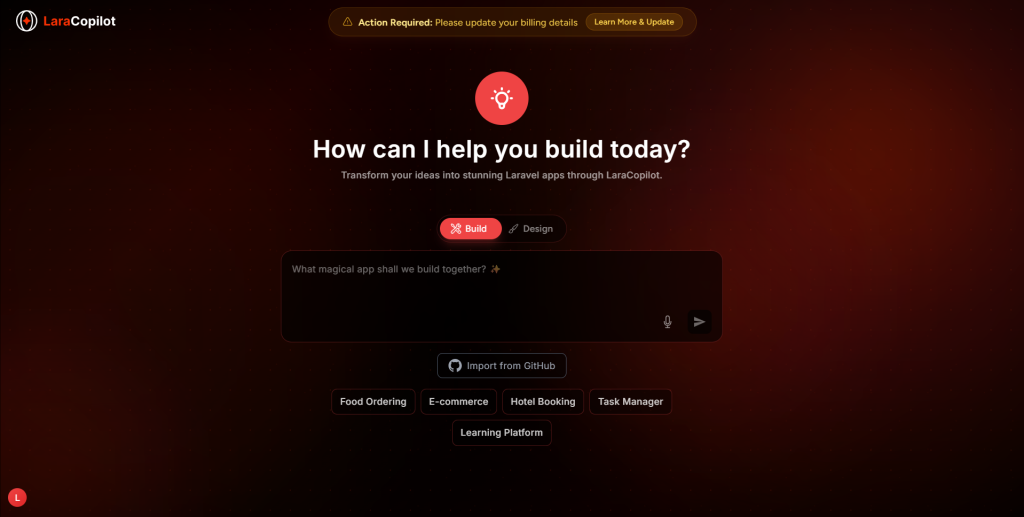
If you know what the app should do — use Build Mode.
Type something like “I want a hotel booking system where users can search by date, pick a room, and pay online.” LaraCopilot takes that and starts building the Laravel backend — the logic, the database structure, the routes. You don’t need to explain how any of it works technically. You just need to know what it should do.
If you know what the app should look like — use Design Mode.
Maybe you have a Figma file. Maybe you’ve seen a product you like and want something similar. Maybe you just know the layout feels wrong and you want to fix it before writing a single line of logic. Design Mode lets you start there with the visual layer and LaraCopilot figures out how to connect it to a working Laravel app underneath.
That’s it. Two entry points. Same destination.
Why We Built This
We kept hearing two very different complaints from two very different types of users.
Founders kept saying: “I know what I want but I don’t know how to describe it technically.”
CTOs kept saying: “I know how it works technically but I need to see it before I can explain it to my team.”
Both problems are real. And they’re basically opposites. One mode was never going to fix both.
So now there are two. And you just pick the one that matches how your brain is working that day.
Quick-Start Options Help Too
If you’re not sure where to begin, you’ll notice five prompts already waiting for you — Food Ordering, E-commerce, Hotel Booking, Task Manager, Learning Platform. These aren’t just examples. They pre-load context so LaraCopilot already understands the type of app you’re building before you say anything. Your first result comes out closer to what you actually need.
Go Try It
Both modes are live right now. Open LaraCopilot, look for the toggle, and just pick whichever one feels right.
You don’t need to fully understand it before you start. That’s kind of the point.