You describe a change. LaraCopilot makes it. You look at the result and think, this is not what I meant.
Maybe the colors look wrong.
Maybe the layout breaks something else.
Maybe you just want to try a different idea.
Before this, fixing it took time. You had to undo changes manually, find the files, and repair things before trying again.
Now you don’t.
What’s New: Revert Changes
After every prompt, LaraCopilot shows what changed.
You see:
Which files were modified
What lines changed
Right next to it, you see one button: Revert changes
Click it. Confirm it. You’re back to where you started.
No searching through files.
No manual fixes.
No starting over.
You try something. If it fails, you go back and try again.
Why This Matters
Working with AI is experimental.
Sometimes it gets it right.
Sometimes it’s close.
Sometimes it’s completely wrong.
That’s normal.
The real problem was not the wrong result.
The problem was how hard it felt to fix it.
When reverting takes effort:
You play safe
You avoid big changes
You slow down
When reverting takes one click:
You try bold ideas
You explore more options
You move faster
This feature removes the fear of getting it wrong.
How It Works
After a prompt runs, LaraCopilot shows a list of changed files like:
app.blade.php
index.blade.php
create.blade.php
You can expand the list to review changes.
If something looks wrong or you just want a different approach, click Revert changes.
Confirm it.
Every file goes back to exactly how it was before.
Then you try again.
Ready to Code Smarter with Laravel?
Meet LaraCopilot — your AI full-stack assistant built for Laravel developers.
Skip the boilerplate, build faster, and focus on what matters: problem solving.
Most AI build tools have the same quiet assumption baked in that you’re starting from zero.
New project. Blank slate. Fresh database. Clean slate.
But that’s not most people’s reality. Most developers and founders we talk to already have a Laravel project. It’s been running for a year, maybe three. It has real users, real data, real complexity. And they don’t want to rebuild it, they just want help working inside it faster.
That’s exactly what this feature is for.
What’s New
You can now import any existing Laravel project directly into LaraCopilot via GitHub and start working with it immediately.
No manual setup. No copy-pasting files. No describing your project structure from scratch and hoping LaraCopilot understands it. You connect your GitHub repo, LaraCopilot pulls it in, reads it, and gets context on what you’ve already built.
From that point, it works with your actual codebase not a blank template.
Why This is a Bigger Deal Than It Sounds
When you start a conversation with an AI tool without giving it context, you spend the first ten minutes explaining your project. Your folder structure. Your database relationships. How your auth works. What packages you’re using. What you’ve already tried.
That context-setting is exhausting, and it’s easy to get wrong.
Import from GitHub skips all of that. LaraCopilot reads your repo and already knows what it’s working with. So when you say “add a role-based permission system,” it’s not giving you a generic answer, it’s giving you an answer that fits your project specifically.
That’s the difference between a tool that helps in theory and a tool that helps in practice.
Who This Is Actually For
If you’re a founder who built an MVP six months ago and now wants to move faster without hiring more developers, this is for you.
If you’re a CTO whose team has a working Laravel app but keeps hitting walls on new features — this is for you.
If you’ve tried AI tools before and gave up because they didn’t understand your existing code — this is especially for you.
You don’t have to start over to get the benefits of LaraCopilot. You just bring what you already have.
Ready to Code Smarter with Laravel?
Meet LaraCopilot — your AI full-stack assistant built for Laravel developers.
Skip the boilerplate, build faster, and focus on what matters: problem solving.
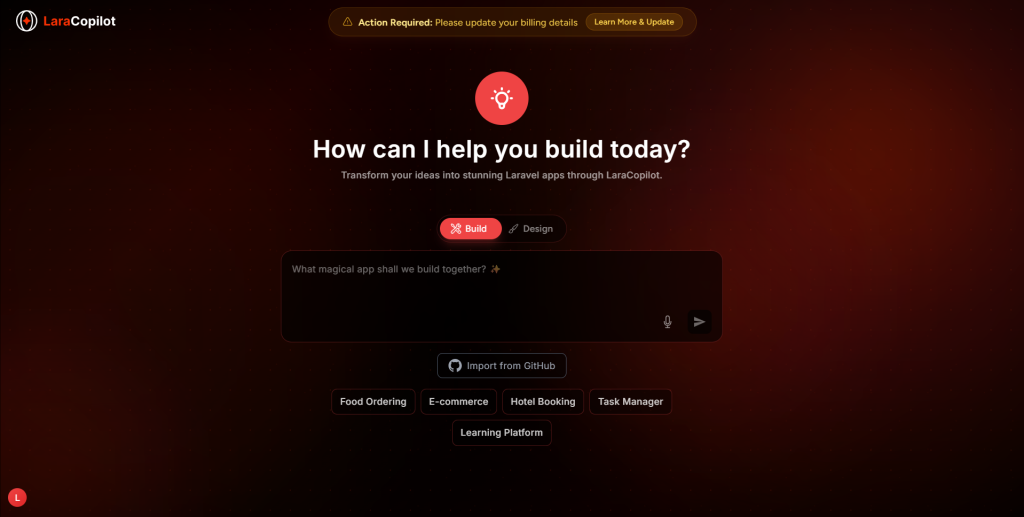
You’ll see the Import from GitHub button right on the LaraCopilot home screen. Click it, connect your repo, and you’re in. LaraCopilot will orient itself to your project and you can start giving it instructions straight away.
That’s it. No long setup. No configuration files. No onboarding checklist.
Just your existing project now with LaraCopilot working inside it.
Most people who want to build a Laravel app don’t start with a database schema. They start with a feeling. A problem they’ve seen. A product they wish existed. And then they get stuck the moment a tool asks them to “describe your architecture.”
That gap between the idea in your head and the technical input a tool needs is exactly what we were trying to close.
So we built Build Mode and Design Mode.
Start From Where You Are, Not Where the Tool Expects You to Be
Here’s the simplest way to explain the difference.
If you know what the app should do — use Build Mode.
Type something like “I want a hotel booking system where users can search by date, pick a room, and pay online.” LaraCopilot takes that and starts building the Laravel backend — the logic, the database structure, the routes. You don’t need to explain how any of it works technically. You just need to know what it should do.
If you know what the app should look like — use Design Mode.
Maybe you have a Figma file. Maybe you’ve seen a product you like and want something similar. Maybe you just know the layout feels wrong and you want to fix it before writing a single line of logic. Design Mode lets you start there with the visual layer and LaraCopilot figures out how to connect it to a working Laravel app underneath.
That’s it. Two entry points. Same destination.
Why We Built This
We kept hearing two very different complaints from two very different types of users.
Founders kept saying: “I know what I want but I don’t know how to describe it technically.”
CTOs kept saying: “I know how it works technically but I need to see it before I can explain it to my team.”
Both problems are real. And they’re basically opposites. One mode was never going to fix both.
So now there are two. And you just pick the one that matches how your brain is working that day.
Quick-Start Options Help Too
If you’re not sure where to begin, you’ll notice five prompts already waiting for you — Food Ordering, E-commerce, Hotel Booking, Task Manager, Learning Platform. These aren’t just examples. They pre-load context so LaraCopilot already understands the type of app you’re building before you say anything. Your first result comes out closer to what you actually need.
Go Try It
Both modes are live right now. Open LaraCopilot, look for the toggle, and just pick whichever one feels right.
You don’t need to fully understand it before you start. That’s kind of the point.
Laracopilot now lets you deploy your app in one click using Laravel Cloud.
No setup.
No manual steps.
No switching tools.
Just build and go live.
What’s New
You can now deploy your Laravel application directly from Laracopilot.
One-click deployment
No server configuration
No manual commands
From code → live app in seconds.
Why This Matters
Deployment is where most builders slow down.
You finish building…
Then spend hours figuring out:
servers
configs
deployment steps
It breaks your flow.
This update removes that gap.
Built for Speed
With this integration, deployment becomes part of your build process.
You don’t need to:
leave your workspace
configure environments manually
depend on complex DevOps steps
You build → you click → it’s live.
No More Context Switching
Earlier, the workflow looked like this:
Build in one place
Deploy in another
Debug somewhere else
Now it’s all in one flow.
Everything happens inside Laracopilot.
From Idea to Live App
This feature is especially useful when you want to:
test ideas quickly
launch MVPs faster
ship without delay
You don’t get stuck between “it works locally” and “it’s live”.
Who This Is For
Developers who want faster deployments
Founders shipping MVPs
Indie builders moving quickly
Small teams avoiding DevOps complexity
If deployment slows you down, this fixes it.
What You Can Do Next
Build your Laravel app in Laracopilot
Click deploy
See it live instantly
No extra steps.
Ready to Code Smarter with Laravel?
Meet LaraCopilot — your AI full-stack assistant built for Laravel developers.
Skip the boilerplate, build faster, and focus on what matters: problem solving.
Laracopilot now lets you invite team members and collaborate inside the same workspace.
This is a simple update.
But it changes how you build.
What’s New
You can now add people to your Laracopilot projects.
Invite team members in a few clicks
Work on the same project together
Share access without extra setup
No more working in isolation.
Why This Matters
Most real products are not built alone.
Even if you start solo, sooner or later you:
bring in a developer
involve a designer
work with a teammate
Before this, collaboration meant switching tools or sharing access manually.
Now, it happens inside Laracopilot.
Built for Team Workflows
This is not just about adding users.
It’s about building together.
You can:
collaborate on the same Laravel project
align faster without long back-and-forth
keep everything in one place
No need to explain context again and again.
Everyone works on the same source.
Less Friction, More Speed
Collaboration usually slows things down:
sharing files
managing access
syncing changes
This update removes that friction.
You invite → they join → you build.
That’s it.
From Solo Tool to Team Platform
Earlier, Laracopilot was mostly used by individual builders.
Now it fits team environments as well.
Small dev teams
Startup builders
Indie hackers working together
It grows with you.
Who This Is For
Developers working in teams
Founders building with small groups
Agencies managing multiple projects
Solo founders who occasionally collaborate
Indie builders working with partners
2-person teams shipping fast
Small startups (5–10 people)
Anyone tired of switching between tools to collaborate.
If you’re not building alone, this feature matters.
What You Can Do Next
Invite your team
Start working on the same project
Build faster without tool switching
Simple change.
Real impact.
Ready to Code Smarter with Laravel?
Meet LaraCopilot — your AI full-stack assistant built for Laravel developers.
Skip the boilerplate, build faster, and focus on what matters: problem solving.
Laracopilot now supports private repository integration with GitHub.
This is a simple update, but it changes how you actually use Laracopilot.
Before this, most workflows stayed around test projects or isolated environments.
Now, you can work directly with your real code.
What’s New
You can connect your private GitHub repositories to Laracopilot and start working instantly.
Access private Laravel codebases securely
Sync your existing projects
Work without moving code manually
No extra setup. No workaround.
Just connect and start.
Why This Matters
Most developers don’t start from scratch.
You already have:
existing projects
client codebases
production apps
But many tools force you to rebuild or copy things into a new environment.
That slows you down.
With this update, Laracopilot fits into your current workflow instead of replacing it.
Built for Real Workflows
This integration is not just about access.
It’s about using AI on top of real projects.
You can:
explore your existing code
make changes faster
iterate without breaking your flow
Everything stays where it should be inside your GitHub repo.
Security & Control
Private repositories stay private.
The integration is designed to work with secure access, so your code is not exposed or moved unnecessarily.
You stay in control of your codebase.
From Side Tool to Core Workflow
This update moves Laracopilot from being a “nice-to-have” tool to something you can actually rely on daily.
You don’t need to:
copy files
recreate projects
switch between tools constantly
You connect once, and you’re ready to build.
Who This Is For
Developers working on private Laravel projects
Teams managing internal codebases
Builders who don’t want to start from scratch
If your code lives on GitHub, this feature is built for you.
What You Can Do Next
Connect your private repository
Import your Laravel project
Start building with AI on top of your existing code
No setup friction. No extra steps.
Ready to Code Smarter with Laravel?
Meet LaraCopilot — your AI full-stack assistant built for Laravel developers.
Skip the boilerplate, build faster, and focus on what matters: problem solving.
That’s where most developers hit the wall with context aware ai coding or more accurately, the lack of it.
You prompt.
It responds confidently.
And then… everything breaks.
Wrong architecture.
Random patterns.
Controllers that don’t match your project.
And you’re left debugging code you didn’t even write.
So the real question isn’t:
“Can AI generate Laravel code?”
It’s:
Can it generate code that actually fits your repo?
Real Problem: AI Doesn’t Know Your Codebase
Let’s be honest.
You’ve probably tried tools like ChatGPT or Copilot for Laravel.
Sometimes they work.
But most of the time?
It assumes a generic Laravel structure
Ignores your service layer
Misses your naming conventions
Hallucinates methods that don’t exist
And the worst part?
It looks correct.
That’s what makes it dangerous.
Because now you’re not just writing code,
you’re reviewing AI-generated mistakes.
And that takes longer than doing it yourself.
Most AI tools fail at one thing:
They don’t understand your repo context.
They generate code based on:
Public patterns
Training data
Guesswork
Not your actual application.
Why “Repo Context” Changes Everything
Here’s the shift most developers miss:
AI shouldn’t generate code in isolation.
It should generate code inside your system.
That’s what repo context Laravel actually means.
Instead of asking:
“Write a controller”
You’re enabling:
“Write a controller that fits this exact project”
That includes:
Your folder structure
Existing models and relationships
Naming conventions
Business logic patterns
Custom helpers and services
Without this, AI is just guessing.
With this, AI becomes… dangerous in a good way.
What We Learned After Testing AI on Real Laravel Projects
We didn’t just test AI casually.
We ran it across:
Multiple Laravel apps (5K–50K LOC)
Different architectures (monolith + modular)
Real production use cases
And here’s what showed up consistently:
1. 70% of AI Code Needed Fixing
Even when prompts were clear.
Issues included:
Wrong namespaces
Missing dependencies
Incorrect relationships
Logic mismatches
2. Hallucinations Increase With Complexity
Simple CRUD? Fine.
But once you involve:
Services
Queues
Events
Custom logic
AI starts inventing things.
3. Context Depth = Code Quality
The more context AI had, the better the output.
But most tools only use:
Prompt text
Small snippets
That’s not enough.
How LaraCopilot Uses Repo Context (The Real Difference)
Here’s where things change.
LaraCopilot doesn’t treat your prompt as the source of truth.
It treats your repository as the source of truth.
1. It Reads Your Project Structure
Before generating anything, it understands:
How your Laravel app is organized
Where controllers, services, and models live
How files relate to each other
So instead of guessing paths…
It uses your actual structure.
2. It Understands Existing Code Patterns
This is the part most tools miss.
LaraCopilot looks at:
How you write queries
How your services are structured
How validation is handled
Your coding style
So when it generates code…
It doesn’t introduce new patterns.
It continues your existing ones.
3. It Connects to Real Models & Relationships
Generic AI might say:
“User hasMany Posts”
But your project might have:
Custom scopes
Different naming
Pivot tables
Domain-specific logic
LaraCopilot references your actual models.
So instead of hallucinating relationships…
It builds on what already exists.
4. It Reduces Hallucinations by Grounding Output
Hallucination happens when AI fills gaps.
Repo context removes those gaps.
Because now:
Functions are verified
Classes exist
Dependencies are real
So the output isn’t “likely correct” —
it’s contextually valid.
Ready to Code Smarter with Laravel?
Meet LaraCopilot — your AI full-stack assistant built for Laravel developers.
Skip the boilerplate, build faster, and focus on what matters: problem solving.
Most SaaS tools charge you for access. You pay a monthly fee, log in, and whether you build one project or fifty, the bill looks the same.
LaraCopilot works differently.
The pricing model is built on a single principle: pay for results, not access. Every credit you spend produces a real, deployment-ready Laravel output — a scaffold, a feature, an iteration. You are not paying to use a dashboard. You are paying for work that gets done.
This distinction matters because it aligns the cost of LaraCopilot directly with the value it delivers. The more you build, the more you pay and the more you earn, ship, and deliver in return.
Here is a clear breakdown of every plan, who it is built for, and how to know which one matches where you are right now.
Credit System — What You Are Actually Buying
Before comparing plans, it helps to understand what a credit is.
Each credit on LaraCopilot represents a meaningful build action generating a scaffold, adding a feature module, creating an API layer, iterating on an existing structure. Credits are not consumed by browsing, by viewing your project, or by managing your team. They are spent when the AI is actively producing Laravel code for your application.
This makes the credit system transparent in a way that flat-fee access models are not. You always know what you are getting for what you spend. And because every credit produces something tangible and deployable, the return on each one is measurable.
With that foundation clear, here is every plan in detail.
Free Plan — Right Starting Point
Price: Free forever
Credits: 10
Projects: 2
Team seats: 1
Project visibility: Public only
Support: Community
The free plan exists for one purpose: to let you evaluate the output before committing to anything.
10 credits is enough to scaffold a real Laravel project. A working authentication system, a CRUD layer, a RESTful API, an admin panel generated in approximately 10 minutes. You can review every line of code, push it to a repository, and make a fully informed decision about whether LaraCopilot belongs in your workflow.
This is not a limited demo with artificial restrictions designed to frustrate you into upgrading. It is a genuine evaluation window enough to build something real and judge the quality of the result yourself.
Who the Free plan is for:
Developers who have never tried LaraCopilot and want to evaluate the output quality before spending anything
Students or junior developers exploring AI-assisted Laravel development for the first time
Developers building small public experiments or open-source projects with minimal scope
The honest limitation:
10 credits covers the exploration phase. The moment you want to build a second serious project, add GitHub integration, keep your work private, or bring in a collaborator — you have reached the boundary of what the free plan is designed to handle. That boundary is intentional: the free plan shows you what is possible; the paid plans are where you build what matters.
Starter Plan — Solo Developer’s Workhorse
Price: $29/month
Credits: 120 per month
Projects: Unlimited
Team seats: 2
Project visibility: Private
Support: Email
Integrations: GitHub
The Starter plan is where serious solo development begins.
120 credits per month is enough to scaffold multiple complete Laravel projects, iterate on existing ones, and ship real work consistently across a month. The jump from 10 to 120 credits is not incremental, it is the difference between evaluating the tool and actually using it as part of your workflow.
Three things make the Starter plan specifically valuable for independent developers.
Private projects by default. Your client work, your SaaS idea, your internal tools — none of it is public. Everything you build is yours, in a private environment, from the moment generation begins.
GitHub integration. Your generated code pushes directly to your private GitHub repository automatically. Version history starts from the first generated file. No manual transfers. No copy-paste into a local setup. Your development workflow begins at the same moment generation ends.
2 team seats. You and one other person — a co-founder, a client who needs visibility, a developer you bring in for a specific module. Enough for the collaboration that solo projects actually require.
The ROI calculation:
If you are a freelancer billing $500 per project minimum, LaraCopilot’s Starter plan pays for itself entirely on the first project you complete with 11 months of the subscription still remaining. The 4–6 hours you save on scaffolding per project, at any reasonable billing rate, exceeds $29 in the first week of use.
Who the Starter plan is for:
Solo Laravel developers and freelancers building client projects
Solo founders building and launching their first SaaS product
Developers who want private GitHub integration and unlimited project capacity without team complexity
Pro Plan — Most Popular Choice for a Reason
Price: $79/month
Credits: 400 per month
Projects: Unlimited
Team seats: 5
Support: Included
Integrations: GitHub + all infra connectors (coming soon)
The Pro plan is marked as LaraCopilot’s most popular and the credit volume explains why.
400 credits per month is the threshold where LaraCopilot shifts from a project-starter into a continuous development partner. You are not just scaffolding new projects; you are actively iterating on existing ones, adding feature modules, refining API layers, and building with AI assistance throughout the entire development cycle.
5 team seats brings a full small team into the same workflow. A backend developer, a frontend specialist, a designer, a product manager, and a client stakeholder can all work within the same LaraCopilot projecton the same generated codebase, in the same private GitHub repository, from day one.
The infra connectors (coming soon) will extend LaraCopilot’s deployment and infrastructure capabilities connecting your projects to the services your production stack depends on, managed from within the same environment where the code was generated.
Who the Pro plan is for:
Small product teams building SaaS applications together
Technical co-founders who need their full early team working in one environment
Laravel developers who have used the Starter plan and found themselves running into the credit ceiling regularly
Agency Plan — Built for Volume and Client Delivery
Price: $199/month
Credits: 1,200 per month
Projects: Unlimited
Team seats: 10
Support: All Pro features included
Extras: Marketplace listing (coming soon)
The Agency plan is designed around one insight: the biggest cost in agency work is not development — it is the time between receiving a brief and showing a client something real.
1,200 credits per month gives an agency enough generation capacity to scaffold every client project, prototype every proposal, and iterate on every active engagement simultaneously. 10 team seats brings your full project squad — developers, project managers, QA, and client contacts into a shared environment.
The marketplace listing (coming soon) adds a distribution dimension no other plan includes. Your agency gets visibility inside the LaraCopilot ecosystem — meaning clients looking for Laravel expertise can find you through the same platform you build on. This is not just a feature; it is a lead generation channel built into your subscription.
The agency workflow this enables:
A client brief arrives Monday morning. By Monday afternoon, you have a working Laravel prototype to show in the proposal. The client sees a real application, not a wireframe. You close the project before your competition has finished writing their scope document.
Who the Agency plan is for:
Laravel agencies running 3 or more concurrent client projects per month
Development shops that want to reduce scaffolding overhead across their entire team
Agencies building their own SaaS products alongside client work
Teams that want marketplace visibility as a qualified lead channel
Extras: Custom domains, full team management, GitHub
The Enterprise plan is for organizations where standard SaaS terms do not apply — where data residency, private deployment, contractual SLAs, and dedicated support are requirements rather than preferences.
Custom credit allocation means your organization’s usage is scoped to its actual needs rather than a fixed tier. Private deployments mean your LaraCopilot environment runs within your own infrastructure, not shared cloud resources. A dedicated account manager means someone who knows your team, your projects, and your workflows not a support ticket queue.
Who Enterprise is for:
Large engineering organizations building on Laravel at scale
Companies in regulated industries where cloud data handling requires contractual guarantees
Organizations that need LaraCopilot integrated with existing enterprise systems and internal tooling
Choosing Your Plan — Simple Decision Framework
If you are…
Start with…
Evaluating LaraCopilot for the first time
Free
A solo developer or freelancer ready to build
Starter — $29/mo
A small team building a product together
Pro — $79/mo
An agency delivering multiple client projects
Agency — $199/mo
An enterprise with custom compliance requirements
Enterprise
The free plan shows you what LaraCopilot does. Every paid plan is priced against the value of what it eliminates — the scaffolding hours, the infrastructure overhead, the delivery delays that currently sit between your team’s expertise and the work that actually matters.
Start where you are. Upgrade when the credits tell you to.
Laravel Eloquent defines six primary relationship types: hasOne, hasMany, belongsTo, belongsToMany, hasManyThrough, and hasOneThrough. The foreign key always lives on the model that calls belongsTo, and on the pivot table when using belongsToMany. If you describe a relationship in plain English (“a User has many Posts”), LaraCopilot generates both the correct model methods and the migration with the right foreign key column in one session.
Eloquent Relationship Rules Every Laravel Developer Needs Saved
Laravel has six core relationship types: hasOne, hasMany, belongsTo, belongsToMany, hasManyThrough, and hasOneThrough.
The foreign key lives on the child model’s table in hasOne and hasMany relationships.
The model that calls belongsTo is the one that holds the foreign key column.
belongsToMany requires a pivot table named using both model names in alphabetical order (e.g., post_tag).
Eloquent automatically infers the foreign key as snake_case(ModelName) + _id by convention.
hasManyThrough is not a many-to-many relationship. It is a shortcut to access distant relationships through an intermediate model.
A polymorphic relationship (morphMany, morphTo) allows one model to belong to multiple other model types using a shared _id and _type column pair.
LaraCopilot generates both model relationship methods and the corresponding migration from a plain English description of the data relationship.
If You Have Ever Googled “where does the foreign key go in Laravel”
You are not alone and the confusion is structural, not a skill gap. Every relationship type has a different rule, and getting one wrong means a silent bug that only surfaces when you try to eager load data.
Every Eloquent Relationship Type Explained
hasOne — one parent, one child
Rule: One model owns exactly one related model. The foreign key lives on the related (child) model’s table, not on the parent.
Example: A User has one Profile. The profiles table holds the user_id foreign key.
Model:
// User.php
public function profile(): HasOne
{
    return $this->hasOne(Profile::class);
}

// Profile.php
public function user(): BelongsTo
{
    return $this->belongsTo(User::class);
}
Migration: Add user_id to the profiles table, not the users table.
Rule: One model owns many related models. The foreign key lives on the child model’s table.
Example: A Post has many Comments. The comments table holds the post_id foreign key.
Model:
// Post.php
public function comments(): HasMany
{
    return $this->hasMany(Comment::class);
}

// Comment.php
public function post(): BelongsTo
{
    return $this->belongsTo(Post::class);
}
Rule: The model that calls belongsTo is the one that holds the foreign key. This is the inverse of both hasOne and hasMany.
Example: A Comment belongs to a Post. The comments table holds post_id.
// Comment.php
public function post(): BelongsTo
{
    return $this->belongsTo(Post::class);
}
When to use it: Any time a model has a foreign key column pointing to another model, define belongsTo on that model.
belongsToMany — many-to-many with a pivot table
Rule: Neither model holds the foreign key directly. Both foreign keys live in a separate pivot table.
Example: A Post belongs to many Tags, and a Tag belongs to many Posts. A post_tag pivot table holds post_id and tag_id.
Model:
// Post.php
public function tags(): BelongsToMany
{
    return $this->belongsToMany(Tag::class);
}

// Tag.php
public function posts(): BelongsToMany
{
    return $this->belongsToMany(Post::class);
}
Migration: Create a pivot table named with both model names in alphabetical order, singular, separated by an underscore.
Schema::create('post_tag', function (Blueprint $table) {
    $table->id();
    $table->foreignId('post_id')->constrained()->cascadeOnDelete();
    $table->foreignId('tag_id')->constrained()->cascadeOnDelete();
});
Extra pivot data: To store additional columns on the pivot table (e.g., assigned_at), add ->withPivot('assigned_at')->withTimestamps() to the relationship method.
hasManyThrough — access distant relationships
Rule: Used when model A relates to model C through model B. No pivot table. Model B holds A’s foreign key. Model C holds B’s foreign key.
Example: A Country has many Posts through Users. Users belong to a country. Posts belong to a user.
Model:
// Country.php
public function posts(): HasManyThrough
{
    return $this->hasManyThrough(Post::class, User::class);
}
When to use it: When you need to reach a model two relationships away without building a direct relationship.
Common confusion:hasManyThrough is not a many-to-many relationship. It is a chain of two one-to-many relationships.
hasOneThrough — single distant model
Rule: The same pattern as hasManyThrough, but used when the end result is a single model rather than a collection.
Example: A Mechanic has one Car through an Owner. The mechanic accesses the car through the owner they service.
// Mechanic.php
public function car(): HasOneThrough
{
    return $this->hasOneThrough(Car::class, Owner::class);
}
Polymorphic relationships — one model, many parent types
Rule: A single model can belong to more than one other model type using a shared *_id and *_type column pair.
Example: A Comment can belong to either a Post or a Video.
Models:
// Comment.php
public function commentable(): MorphTo
{
    return $this->morphTo();
}

// Post.php
public function comments(): MorphMany
{
    return $this->morphMany(Comment::class, 'commentable');
}

// Video.php
public function comments(): MorphMany
{
    return $this->morphMany(Comment::class, 'commentable');
}
Migration: The comments table needs commentable_id and commentable_type.
php$table->morphs('commentable');
Step-by-Step: Generate Eloquent Relationships with AI
Step 1: Describe the relationship in one plain English sentence
The more specific, the better. Examples:
“A User has many Orders. An Order belongs to one User.”
“A Post belongs to many Tags. A Tag belongs to many Posts.”
“A Country has many Posts through Users.”
Step 2: Paste the description into LaraCopilot
LaraCopilot reads the plain English description and identifies the correct relationship type, the foreign key placement, and the migration column requirements.
Step 3: Review the generated model methods
LaraCopilot generates both sides of every relationship. Review that:
belongsTo is on the model with the foreign key column
hasMany or hasOne is on the parent model
belongsToMany appears on both models with the correct pivot table name
Step 4: Review the generated migration
For hasOne and hasMany, confirm the foreign key column is on the child table.
For belongsToMany, confirm a pivot table migration was generated with both foreign keys.
For polymorphic relationships, confirm $table->morphs('commentable') is present.
Step 5: Run migrations and test
php artisan migrate
php artisan test --filter RelationshipTest
6 Relationship Mistakes That Create Silent Query Bugs
Mistake 1: Putting belongsTo on the wrong model.
The foreign key is on the comments table, so belongsTo goes in the Comment model, not the Post model.
Do this instead: Find the table with the _id column. That model gets belongsTo.
Mistake 2: Naming a pivot table incorrectly.
Laravel expects alphabetical order: post_tag, not tag_post.
Do this instead: Alphabetize both model names, singular, with an underscore.
Mistake 3: Forgetting ->constrained() on foreign key migrations.
Without it, the foreign key reference exists without a database constraint, which allows orphaned records.
Do this instead: Always chain ->constrained() after foreignId().
Mistake 4: Using hasManyThrough for a many-to-many relationship.
hasManyThrough chains two one-to-many relationships. It does not replace a pivot table.
Do this instead: If both models can have many of the other, use belongsToMany.
Mistake 5: Skipping ->withTimestamps() on pivot tables that need created_at.
The pivot table will not populate timestamp columns without this method call.
Do this instead: Add ->withTimestamps() to belongsToMany() when the pivot table has timestamp columns.
Mistake 6: Defining only one side of the relationship.
Defining hasMany on Post without belongsTo on Comment means you cannot traverse the relationship in both directions.
Do this instead: Always define both sides — the parent and the inverse.
Eloquent Relationship Assumptions That Break Queries
Assumption 1: belongsTo and hasMany are interchangeable depending on where you call them.
They are inverses of each other, but the method name tells Eloquent where to look for the foreign key. Swapping them without changing the schema produces silent null returns, not exceptions.
Assumption 2: A pivot table always needs its own Model class.
A basic pivot table does not require a model. You only need a dedicated Pivot model when querying the pivot table directly or attaching custom behavior to it.
Assumption 3: Polymorphic relationships are for edge cases only.
Polymorphic relationships are the correct tool any time one model can belong to more than one parent type. Comments, tags, images, and notifications are everyday real-world uses.
Assumption 4: AI cannot generate correct Eloquent relationships without knowing the full schema.
A Laravel-native AI generator with schema context generates both model methods and migrations correctly, including the correct foreign key placement and pivot table naming conventions, from a plain English description.
Why Getting the Relationship Direction Wrong Costs More Than the Debug Time
The Laravel documentation on relationships is thorough. The confusion is not from lack of documentation, it is from the fact that hasMany and belongsTo both reference the same database column from different model perspectives.
A junior developer who places belongsTo on the parent model instead of the child creates a query that returns null silently or throws a SQL error only when the relationship is actually used. The bug is not always immediately obvious, and fixing it after the migration is run means generating a new migration, running rollback, and rebuilding the data.
In a real project with eight to twelve models and two to three relationships each, getting two or three foreign keys in the wrong place is not unusual. Each one costs 20 to 60 minutes of debugging. Generating correct relationships from the start avoids that debugging entirely.
The FLIP Framework is a four-step mental model for identifying the correct Eloquent relationship and foreign key placement without referencing documentation.
F — Find the “many” side. Which model has more rows? That model’s table usually holds the foreign key. A comments table has more rows than a posts table, so comments holds post_id.
L — Look for a pivot. If both models can have many of the other, neither holds the foreign key directly. A pivot table is needed. Use belongsToMany.
I — Inverse is always belongsTo. The model with the foreign key column always calls belongsTo. No exceptions.
P — Parent defines hasOne or hasMany. The model without the foreign key column defines hasOne (one child expected) or hasMany (multiple children expected).
When to use it: Any time you are setting up a new relationship and second-guessing the method and foreign key placement.
Pattern Most Relationship Guides Ignore
Most Eloquent tutorials focus on what each relationship type does. Almost none of them address the pattern that causes the most real-world bugs: the relationship direction and the foreign key placement are two separate decisions, and getting either one wrong does not always produce an immediate error.
A hasMany on the wrong model returns an empty collection. A belongsTo on the wrong model returns null. Neither throws a PHP exception. Both create silent data bugs that surface mid-feature when the developer cannot understand why the query returns nothing.
Polymorphic columns: use $table->morphs('morphable') to generate both columns at once
Manual Relationship Setup vs AI-Generated from Plain English
Manual Setup
AI-Generated with LaraCopilot
Look up relationship type in documentation
Describe the relationship in one sentence
Decide foreign key placement manually
Foreign key inferred and placed correctly
Write model method on parent only
Both model methods generated together
Write a separate migration manually
Migration generated as connected output
Debug silent null returns from wrong direction
Correct direction on first generation
Repeat for every model pair
All model relationships generated in one session
Wrap-up!
Laravel Eloquent provides six primary relationship types, each with a specific foreign key rule and migration requirement. The most common source of error is placement direction: belongsTo always goes on the model that owns the foreign key column, hasMany goes on the parent, and belongsToMany requires a pivot table. A Laravel-native AI generator produces both model methods and the correct migration together from a plain English description, so the silent direction errors that are hardest to debug never reach the codebase in the first place.
Get Your Relationships Right the First Time
Describe your data model in plain English and get every model method and migration generated correctly from the start.
Every “best AI coding tools 2026” list is written for a JavaScript developer.
The benchmarks use React and Node. The screenshots are TypeScript. The recommendations assume you’re building a Next.js app with a Supabase backend. If you build in Laravel and PHP, you either map the advice across yourself or give up and pick something that mostly works.
This ranking is different. Every tool here was evaluated against the things that actually matter for PHP and Laravel work — Eloquent correctness, convention awareness, CRUD scaffolding quality, and whether the generated output needs significant rework before it fits a real project.
How we ranked these tools
Twelve tools. Three test categories:
PHP fluency — does it understand PHP-specific patterns, types, and idioms?
Laravel conventions — does it understand Eloquent, Artisan, resources, policies, Filament, and Pest?
Scaffolding quality — does it generate connected, production-relevant output, or disconnected snippets?
Each tool was tested on the same set of real tasks: a five-model CRUD scaffold, an API resource layer, a Filament v3 admin resource, a policy with role-based authorization, and a Pest feature test. Same inputs, same evaluation criteria.
Here’s what we found.
The full ranking at a glance
#
Tool
Best For
Laravel Score
Price
1
LaraCopilot
Laravel-native full-stack generation
★★★★★
From $29/mo
2
Cursor
Multi-file refactoring, complex codebases
★★★☆☆
$20–$200/mo
3
Claude Code
Large codebases, terminal-native reasoning
★★★☆☆
Usage-based
4
GitHub Copilot
General coding, GitHub-native teams
★★★☆☆
$10–$39/mo
5
Windsurf
Budget-friendly Copilot alternative
★★☆☆☆
Free–$15/mo
6
Augment Code
Enterprise codebase context
★★☆☆☆
Custom pricing
7
JetBrains AI
PhpStorm users, tight IDE integration
★★☆☆☆
From $8/mo
8
Tabnine
Privacy-first teams, on-prem deployment
★★☆☆☆
From $9/mo
9
Supermaven
Large monorepos, low-latency autocomplete
★★☆☆☆
Free–$10/mo
10
Cline
Open-source, bring-your-own-model devs
★★☆☆☆
Free
11
Amazon Q Developer
AWS-heavy PHP teams
★★☆☆☆
Free–$19/mo
12
Replit Agent
Quick prototypes only
★☆☆☆☆
From $25/mo
Now the detail that matters.
#1 — LaraCopilot
Laravel score: ★★★★★
The only tool on this list built exclusively for Laravel. Not “supports PHP.” Not “works with Laravel.” Built for it.
That difference shows up immediately in testing. Ask any other tool to generate a Filament v3 resource with role-aware permissions and a corresponding policy — you get something that compiles. Ask LaraCopilot the same thing and you get the correct v3 syntax, the correct policy method signatures, and the correct middleware attachment on the routes. First time.
The output is not a smarter autocomplete. It is a connected, framework-correct stack: model, migration, controller, resource, policy, and Pest tests generated together — pushed directly to your GitHub repository in one session.
For PHP developers outside of Laravel, LaraCopilot is not the right tool. The specialization is the whole point. But for the majority of developers reading this ranking, Laravel is the framework. And on Laravel work, nothing else comes close.
Best for: Laravel developers, agencies, and SaaS teams where the primary stack is Laravel.
Skip if: You work across multiple frameworks daily and need a single tool for all of them.
#2 — Cursor
Laravel score: ★★★☆☆
Cursor is the strongest general-purpose coding agent in 2026 for developers who work inside a complex, multi-file codebase. Its Composer feature allows you to describe a change in natural language and watch it execute across multiple files simultaneously — a genuine productivity step change for refactoring, architecture changes, and working across large existing projects.
For PHP and Laravel specifically, Cursor is meaningfully better than GitHub Copilot. It holds more context, reasons better across files, and produces fewer convention mistakes when prompted clearly. The gap versus a Laravel-native tool is still real — Eloquent relationships occasionally come out using the wrong method, Filament output defaults to v2 patterns unless you specify v3 explicitly but Cursor’s multi-file awareness reduces the stitching work that other general-purpose tools leave behind.
Context window in practice sits around 60–80K tokens of actual code context, which is comfortable up to roughly 30–50 files.
Best for: PHP developers managing large, complex codebases who need multi-file refactoring capability.
Skip if: Laravel-specific correctness on scaffolding tasks is your primary concern — LaraCopilot does that job better.
#3 — Claude Code
Laravel score: ★★★☆☆
Claude Code is the right tool when your codebase is too large to reasonably fit in most agents’ context windows. With a 150K+ token context capacity that reads files on demand rather than pre-indexing everything, it can reason across 100+ file projects where Cursor and Windsurf start to struggle.
For PHP and Laravel, Claude Code’s output quality is good but general. It produces valid Laravel code when prompted well and the developer already knows the framework. The problem is the dependency on prompt quality — Claude Code is powerful when you write an effective task description and underwhelming when you don’t. For senior developers with strong prompting skills, it is a capable tool. For junior developers or anyone wanting framework-correct output without careful steering, it adds friction rather than removing it.
Usage-based pricing means cost can be unpredictable on large sessions. Testing suggests approximately $0.80–$4 per hour of active use depending on task complexity.
Best for: Senior PHP developers working on large codebases who are comfortable with terminal-native workflows and prompt engineering.
Skip if: You want fast Laravel scaffolding without engineering every prompt carefully.
#4 — GitHub Copilot
Laravel score: ★★★☆☆
The most widely deployed AI coding tool in 2026, and still the default recommendation for developers who want broad-coverage assistance without switching IDEs. GitHub Copilot’s inline suggestion quality for PHP is solid. Its chat interface handles debugging, explanation, and general PHP questions well. For developers who touch Laravel occasionally but spend most of their time in other languages, it remains a sensible daily driver.
The limitations for Laravel-specific work are consistent and well-documented: generic PHP output where Laravel conventions belong, Eloquent methods that technically work but are not how a Laravel developer would write them, and no meaningful understanding of how Filament, Livewire, or Pest connect as a workflow. The tool helps — but it helps at the PHP level, not the Laravel level.
GitHub Copilot Pro starts at $10/month. Pro+ at $39/month adds broader premium model access.
Best for: PHP developers working across multiple frameworks who want broad IDE-native coverage.
Skip if: More than half your work is Laravel and Eloquent/convention correctness matters to you on the first generation.
#5 — Windsurf
Laravel score: ★★☆☆☆
Windsurf sits between GitHub Copilot and Cursor in terms of capability and price. Its free tier is the most generous of any tool on this list, and its “Super Complete” feature which predicts changes across multiple cursor positions simultaneously is a genuinely useful addition for repetitive edits.
For PHP and Laravel, Windsurf performs comparably to GitHub Copilot on convention accuracy. It is slightly weaker than Cursor on large, complex multi-file tasks, and its agentic features have gone through pricing and model changes that have created some reliability concerns for teams. For individual developers evaluating AI tools for the first time on a budget, it is a reasonable starting point.
Best for: PHP developers who want Copilot-level assistance without the Copilot price.
Skip if: You need consistent agentic reliability or deep Laravel convention accuracy.
#6 — Augment Code
Laravel score: ★★☆☆☆
Augment Code’s differentiator is codebase indexing depth. Rather than working from context window snapshots, it builds a persistent understanding of your existing codebase and produces suggestions aligned with your existing architecture and patterns.
For PHP and Laravel teams with a large, established codebase that has strong internal conventions, Augment Code’s alignment advantage is meaningful. It will suggest code that looks like your codebase, not generic PHP. For greenfield projects or smaller teams, that advantage is less pronounced and the pricing — enterprise-focused becomes harder to justify.
Best for: Enterprise PHP teams with large, established codebases and consistent internal patterns.
Skip if: You are a freelancer, small agency, or working on new Laravel projects.
#7 — JetBrains AI Assistant
Laravel score: ★★☆☆☆
For Laravel developers running PhpStorm, JetBrains AI Assistant integrates tighter than any external tool can. It understands your project structure, respects your code style settings, and connects to the refactoring and analysis tools already built into the IDE.
The limitation is that JetBrains AI is still a general-purpose assistant, not a Laravel specialist. The IDE-level integration is valuable, but the Laravel convention accuracy is comparable to GitHub Copilot — helpful, not authoritative. Starting from around $8/month, it is worth enabling for PhpStorm users already in the JetBrains ecosystem.
Best for: Laravel developers who use PhpStorm and want seamless IDE integration.
Skip if: You use VS Code or want Laravel-native generation quality.
#8 — Tabnine
Laravel score: ★★☆☆☆
Tabnine’s primary differentiator in 2026 is privacy and on-premises deployment. For agencies and enterprises with client data restrictions or compliance requirements that prevent code from leaving internal infrastructure, Tabnine is one of the few tools that supports full on-premises AI model deployment.
The trade-off is capability. On-prem models are smaller and less capable than the cloud models that power Cursor and Claude Code. For PHP and Laravel work, Tabnine gives reasonable inline suggestions but falls behind significantly on scaffolding quality and convention awareness. It is the right answer to the wrong question for most Laravel developers — the question being “which tool keeps code on our servers” rather than “which tool generates the best Laravel output.”
Best for: Regulated enterprises with strict data residency or compliance requirements.
Skip if: Your priority is output quality on Laravel-specific tasks.
#9 — Supermaven
Laravel score: ★★☆☆☆
Supermaven is optimized for speed and large context — it can process hundreds of thousands of tokens at low latency, making it one of the fastest autocomplete tools available. For PHP developers working on large monorepos where other tools start lagging, that speed difference is noticeable.
Convention accuracy for Laravel is similar to GitHub Copilot. Supermaven accelerates coding; it does not deepen framework understanding. Worth evaluating if raw autocomplete speed is a friction point in your current setup.
Best for: PHP developers on large monorepos who want the fastest autocomplete available.
Skip if: Scaffolding quality or Laravel convention depth is your primary need.
#10 — Cline
Laravel score: ★★☆☆☆
Cline is an open-source VS Code extension that lets you connect your own AI model — Claude, GPT-4, Gemini, local models — and use it as a coding agent inside your editor. For developers who want full control over their model choice and are not comfortable sending code to proprietary services, Cline is the most flexible option available.
PHP and Laravel output quality depends entirely on which model you connect. With a strong model, you get strong output. With a weaker or local model, you get weaker output. The tool itself is the wrapper, not the intelligence.
Best for: Open-source advocates, privacy-conscious developers, and power users who want model control.
Skip if: You want a polished out-of-the-box experience or Laravel-specific generation depth.
#11 — Amazon Q Developer
Laravel score: ★★☆☆☆
Amazon Q Developer is a capable general-purpose coding assistant with deep integration into AWS services and tooling. For PHP teams building on AWS — Lambda, RDS, S3, CloudFront, its awareness of AWS-specific patterns and IAM configurations is meaningfully useful.
For standard Laravel development work, Q Developer is a competent but unremarkable assistant. Its Laravel convention awareness is comparable to GitHub Copilot’s. Teams not heavily invested in the AWS ecosystem will find stronger options elsewhere on this list.
Best for: PHP teams deeply integrated into the AWS ecosystem.
Skip if: Your stack is not AWS-centric.
#12 — Replit Agent
Laravel score: ★☆☆☆☆
Replit Agent earns the last position for a specific reason: it is not designed for Laravel development in any meaningful sense. It is designed for getting a running web application in a browser as quickly as possible — and at that task, it performs well.
For a Laravel developer working on a local or cloud-hosted production project, Replit Agent adds friction rather than removing it. The environment is browser-native, the output is not structured around Laravel conventions, and the tool’s strengths are entirely orthogonal to what a professional PHP developer needs.
Best for: Non-technical builders who need a prototype running in 30 minutes.
Skip if: You are a PHP developer building anything intended to run in production.
Ready to Code Smarter with Laravel?
Meet LaraCopilot — your AI full-stack assistant built for Laravel developers.
Skip the boilerplate, build faster, and focus on what matters: problem solving.
The underlying problem with most AI tools for PHP devs
Most tools on this list are excellent. That is not the issue.
The issue is that “excellent at coding” and “excellent at Laravel” are genuinely different things. Every tool from #2 down was built to serve a broad developer audience — JavaScript, TypeScript, Python, Go, and PHP all receive roughly equivalent treatment. That breadth works well for developers with mixed stacks.
But Laravel is a conventions framework, not just a PHP framework. The correctness that matters — the relationships, the resource structure, the policy wiring, the Artisan awareness, the Filament v3 syntax — is framework-specific knowledge that general-purpose models handle inconsistently. You can prompt your way to better output, but you are doing work the tool should be doing for you.
That is the gap LaraCopilot was built to close. For developers where Laravel is the primary stack, the right question is not “which general tool is least bad at Laravel” — it is “why use a general tool at all when a specialist exists?”
Which tool should you actually use?
If Laravel is 70%+ of your work: LaraCopilot. Not a close call.
If you work across multiple frameworks and need one tool: Cursor or GitHub Copilot depending on whether you want multi-file agent capability or simple IDE-native assistance.
If you manage a large existing Laravel codebase and do a lot of refactoring: LaraCopilot for new feature generation, Cursor for multi-file architectural changes. Both, not either-or.
If you’re a senior PHP developer on AWS: Amazon Q Developer as a complement, not a replacement, for your primary tool.
If your team has strict data compliance requirements: Tabnine. Everything else is secondary to keeping the code on your infrastructure.
If you use PhpStorm and want zero-friction AI integration: JetBrains AI Assistant on top of whichever primary tool you choose.
Tools built for everyone win everywhere except your stack
For JavaScript developers, this ranking would look different. Cursor might be #1. Claude Code might be #2. LaraCopilot would not be on the list.
But you build Laravel. And on Laravel work — the Eloquent, the policies, the resources, the Artisan conventions, the Filament v3 syntax — the specialist beats the generalist every time. That is not a criticism of the tools above it in the ranking. It is just what happens when a tool is built for the exact problem you have.