
You open your terminal, type php artisan make:model -mcr Product, and three files appear out of thin air: a model, a migration, and a resource controller. It feels like magic until you forget which letters do what, and you are back on Google for the fifth time this week. This cheatsheet fixes that for good. By the end, you will know every php artisan make:model flag, what each one generates, and which combinations are worth memorizing.
Laravel ships the make:model Artisan command so you never hand-write the boilerplate that every model needs. The flags just tell Laravel which extra files to scaffold alongside the model. Get them right and a single line replaces ten minutes of manual setup.
What does php artisan make:model -mcr do?
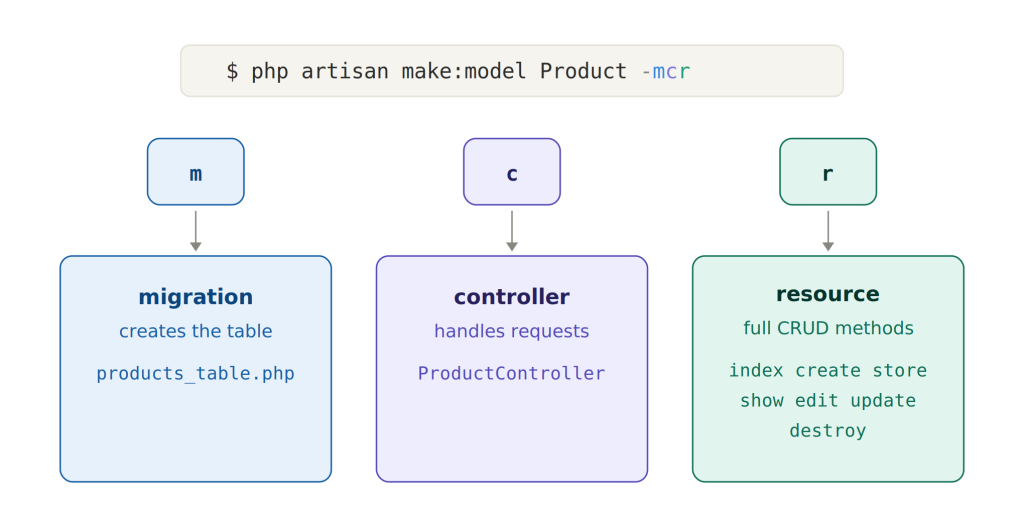
php artisan make:model -mcr Product creates three things at once:
- The Eloquent model (
app/Models/Product.php) - A migration (
m) to build theproductstable - A resource controller (
cplusr) with all seven RESTful methods pre-stubbed
So -mcr is just three single-letter flags glued together: m for migration, c for controller, r for resource. Order does not matter. -mcr, -mrc, and -cmr all produce the identical result. This is the single most common combo for building a new feature, because it gives you the database table and the controller in one keystroke.
If you want the same thing plus form request validation classes, add R: php artisan make:model Product -mcrR.
Full php artisan make:model flag list
Here is every flag the command accepts in Laravel 13, straight from the command signature. This is your reference table.
| Flag | Short | What it generates |
|---|---|---|
--migration | -m | A migration file for the model’s table |
--controller | -c | A plain controller for the model |
--resource | -r | Turns the controller into a resource controller (use with -c) |
--api | none | Turns the controller into an API resource controller (no create/edit methods) |
--requests | -R | Store and Update FormRequest validation classes (use with -c -r) |
--factory | -f | A model factory for testing and seeding |
--seed | -s | A database seeder for the model |
--policy | none | An authorization policy class |
--pivot | -p | Marks the model as a custom pivot (many-to-many) model |
--morph-pivot | none | Marks the model as a polymorphic pivot model |
--test | none | A test class (PHPUnit or Pest, based on your setup) |
--pest | none | Forces a Pest test |
--phpunit | none | Forces a PHPUnit test |
--force | none | Overwrites the model even if it already exists |
--all | -a | The lot: migration, factory, seeder, policy, resource controller, and form requests |
You can confirm this list on your own machine any time with php artisan make:model --help. The official Laravel Eloquent documentation is the authoritative source if a future version adds more.
How to read combined flags like -mcr, -mfsc, and -a
The part that trips up most junior developers is not the individual flags, it is the stacked shorthand. Laravel lets you combine any single-letter flags behind one dash. Read each letter left to right and you have decoded it.
m= migration onlymc= migration + controllermcr= migration + resource controllermfsc= migration + factory + seeder + controllermcrR= migration + resource controller + form requestsa= everything (migration, factory, seeder, policy, resource controller, form requests)
The -a shortcut is the maximalist option. It is fast, but it generates files you may not need, which leaves dead classes in your codebase. Most teams reach for -mcr or -mcrR instead and add a factory only when they actually write tests.
Every make:model flag explained with examples
Now the detail. Each flag below shows the command and what lands in your project.
m / –migration
php artisan make:model Invoice -m
Generates the model plus a timestamped migration in database/migrations. The migration is named for the model’s plural table (invoices). This is the flag you will use on almost every new model, because a model without a table is rarely useful.
c / –controller
php artisan make:model Invoice -c
Creates an empty controller (InvoiceController) with no methods. Useful when you want to define your own routes and actions by hand rather than the standard resource set.
r / –resource and the -mcr combo
php artisan make:model Invoice -mcr
The -r flag is what makes the controller a resource controller, pre-filling the seven REST methods: index, create, store, show, edit, update, and destroy. Important catch: -r does nothing on its own. It only modifies a controller, so you must pair it with -c. That is why php artisan make:model -mcr is so popular, it bundles the migration, the controller, and the resource methods together.
f / –factory
php artisan make:model Invoice -f
Generates a model factory in database/factories. Factories produce fake records for tests and seeders. If you practice test-driven development, add f to your combos early.
s / –seed
php artisan make:model Invoice -s
Creates a seeder class for populating the table with starter data. Pairs naturally with -f since seeders usually call factories.
R / –requests
php artisan make:model Invoice -mcrR
Generates StoreInvoiceRequest and UpdateInvoiceRequest FormRequest classes and wires them into the resource controller’s store and update methods. Note the capital R. The lowercase -r is resource, the uppercase -R is requests. They do completely different jobs, and mixing them up is one of the most common make:model errors.
-policy
php artisan make:model Invoice --policy
Generates an authorization policy so you can gate who may view, update, or delete a record. There is no short flag, so type it out in full.
-api
php artisan make:model Invoice -c --api
Builds an API resource controller. It skips the create and edit methods, since an API has no HTML forms. This is the flag to reach for when you are building a backend for a mobile app or a single-page frontend. If APIs are your main job, a dedicated Laravel API generator approach can save even more time than chaining flags by hand.
p / –pivot and –morph-pivot
php artisan make:model RoleUser -p
Marks the model as a custom pivot model for many-to-many relationships, extending Pivot instead of the base Model. Use --morph-pivot for polymorphic many-to-many tables.
-test, –pest, –phpunit
php artisan make:model Invoice --test
Generates an accompanying test class. --test respects your project’s default framework, while --pest and --phpunit force a specific one.
-force
php artisan make:model Invoice --force
Overwrites an existing model file. Handy when you are regenerating, dangerous when you forget you already edited the file. Use with care.
Which make:model flags do you actually need?
You do not need to memorize all fifteen. For day-to-day Laravel work, three patterns cover almost everything.
- Building a full CRUD feature:
php artisan make:model Product -mcrgives you the table and the controller in one go. - Adding validation:
php artisan make:model Product -mcrRadds the form request classes too. - API-only resource:
php artisan make:model Product -mc --apiskips the form methods you will never render.
Add -f when you start writing tests, and --policy when the feature needs authorization. Everything else is situational. If you are on Laravel 13, you can also run php artisan make:model with no flags at all and Laravel will prompt you interactively for what to generate, which is a friendly way to learn the options. You can read more about what changed in the latest release in our Laravel 13 overview.
Common make:model mistakes and gotchas
A few traps catch developers repeatedly. Knowing them upfront saves real debugging time.
rwithoutcdoes nothing. Resource is a controller modifier, not a standalone generator.randRare not the same. Lowercase is resource methods, uppercase is form request classes.fno longer means force. In older Laravel versionsfwas-force. Todayfis-factory, and force has no short flag. Old tutorials will mislead you here.agenerates files you may not use. A stray empty policy or seeder is harmless but clutters the codebase. Prefer targeted combos.- Model names are singular and PascalCase. Use
Product, notproducts. Laravel pluralizes the table name for you (products), following the conventions described in the Eloquent docs.
Following Laravel’s naming and structure conventions matters because the generated code should pass review without rework. Clean, PSR-compliant output is the difference between scaffolding that ships and scaffolding you have to rewrite.
A faster way to scaffold Laravel models
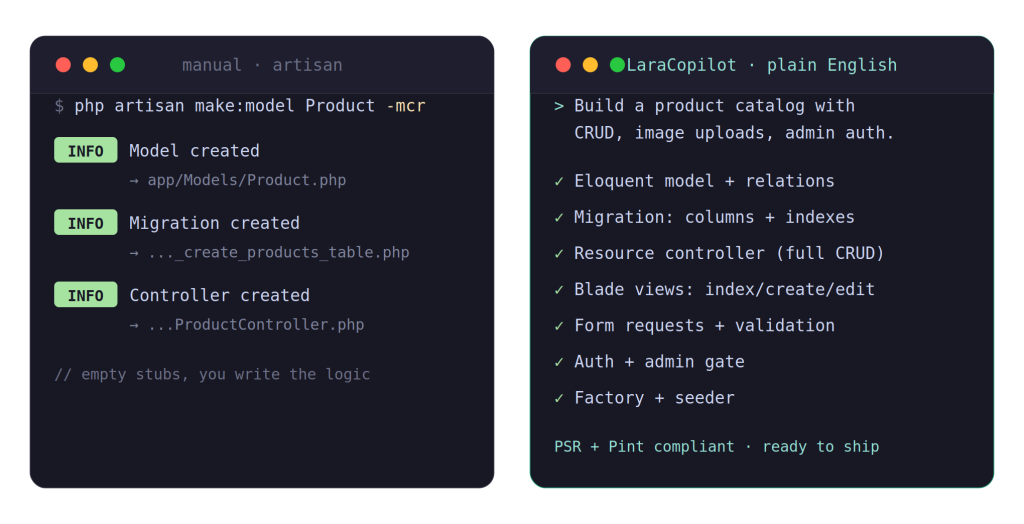
The make:model flags are excellent, but they stop at empty files. The migration has no columns, the controller methods are blank, and the form requests have no rules. You still write all the logic by hand. For a single model that is fine. Across a full application, that boilerplate adds up fast.
This is exactly the gap LaraCopilot closes. Instead of chaining flags and then filling in every file, you describe the feature in plain English and LaraCopilot generates the model, the migration with real columns, the controller logic, validation rules, and the relationships, all to Laravel conventions and ready to ship. It is built specifically for Laravel 13, so the output follows the same standards your team already reviews against.
LaraCopilot is the only AI full-stack engineer built for Laravel developers, and it has scaffolded production-ready apps for 6k+ developers without a single paid ad. If php artisan make:model -mcr is muscle memory but you are tired of writing what comes after, it is worth a look.
Skip the flags entirely
Memorizing make:model flags is a rite of passage. Writing the boilerplate they leave behind does not have to be. If you would rather describe a feature and get production-ready Laravel code back, skip Artisan commands entirely with an AI Laravel generator.
Try LaraCopilot Now at laracopilot.com and turn plain English into shippable Laravel apps.